

Auto-Tune Pro 11 – Professional Pitch Correction
Original price was: $300.00.$11.00Current price is: $11.00.
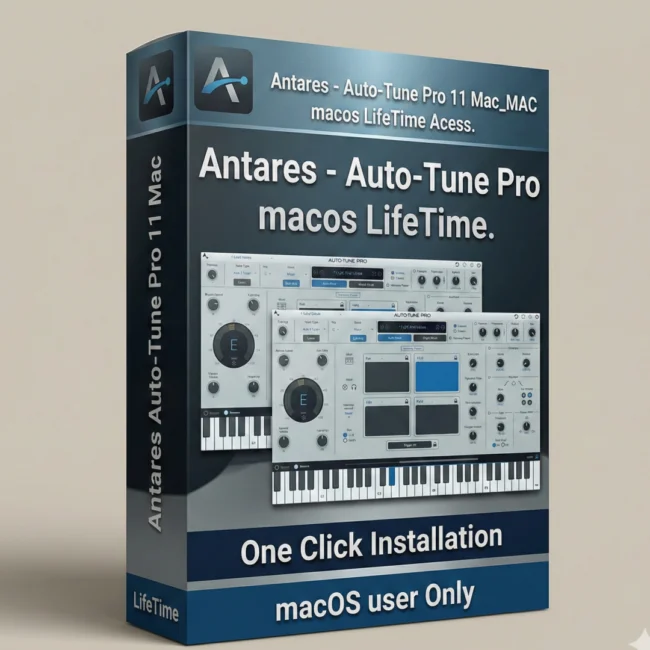
Auto-Tune Pro 11 by Antares. Professional pitch correction with real-time and manual modes, 4-part harmony engine, ARA2 support, and MIDI mapping. Lifetime activation.
Auto-Tune Pro 11 – Professional Pitch Correction & Harmony Software
Welcome to the professional standard for vocal pitch correction: Auto-Tune Pro 11 by Antares. This is the most advanced version of Auto-Tune, the industry-defining vocal processing tool trusted by Grammy-winning producers, platinum-selling artists, and professional recording studios worldwide. With lifetime activation and no recurring fees, Auto-Tune Pro 11 delivers both real-time automatic pitch correction and precise manual pitch editing, complemented by a powerful 4-part harmony engine and seamless DAW integration via ARA2 support.
Whether you’re recording vocal takes, mixing podcasts, producing hip-hop, mixing country vocals, or crafting pop productions, Auto-Tune Pro 11 provides the precision, creative control, and professional sonic quality that separates masterful productions from amateur recordings.
What Is Auto-Tune Pro 11?
Auto-Tune Pro 11 is Antares’ flagship pitch correction and vocal processing plugin—the gold-standard tool for fixing pitch problems, enhancing vocal performances, and creating harmony layers. Unlike basic pitch correction tools that simply force vocals onto correct pitches, Auto-Tune Pro 11 preserves natural vocal characteristics while delivering transparent, professional-quality results.
Antares’ official Auto-Tune Pro 11 product page confirms that this iteration represents the pinnacle of pitch correction technology, combining decades of acoustic modeling with modern real-time processing for unparalleled accuracy and transparency.
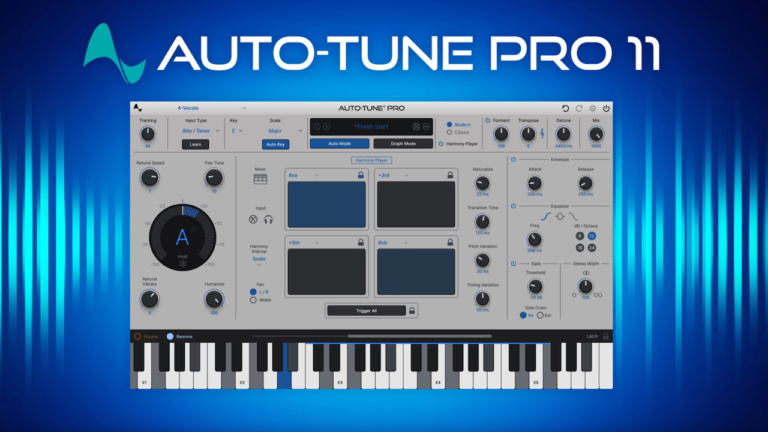
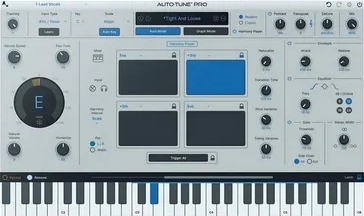
Auto-Tune Pro 11 operates in two powerful modes: Automatic Mode (hands-off real-time pitch correction) and Graph Mode (surgical pitch editing with millisecond-level control). This dual-mode approach makes Auto-Tune Pro 11 equally effective for rapid production workflows and meticulous detail work.
Core Features – Professional-Grade Pitch Correction & Beyond
1. Automatic Mode – Real-Time Pitch Correction
Auto-Tune Pro 11’s Automatic Mode analyzes incoming vocal audio in real-time and corrects off-pitch notes to the nearest semitone in your selected scale. Simply choose your key, select the desired scale (major, minor, chromatic, or custom), and Auto-Tune Pro 11 handles correction instantly. This mode is perfect for:
- Quick fix-ups during recording or mixing
- Batch processing multiple vocal takes rapidly
- Live performance pitch correction
- Real-time monitoring during recording
- Transparent correction that preserves vocal character
The Automatic Mode’s transparent processing means listeners hear the vocalist’s authentic performance—just in perfect pitch. This is the hallmark of professional pitch correction versus the obvious, synthetic “Auto-Tune effect” that dominated early 2000s pop music.
2. Graph Mode – Precise Manual Pitch Editing
For meticulous control, Auto-Tune Pro 11’s Graph Mode displays every note’s pitch contour in a visual interface. Make surgical edits with millisecond-level precision:
- Pitch Grid Editing: Adjust each note’s pitch individually or in real-time
- Vibrato Editing: Enhance, reduce, or reshape vibrato character
- Time Correction: Adjust note timing to align with beat grid or other instruments
- Scale Editing: Define custom scales for non-western music or experimental tuning
- Formant Preservation: Maintain natural voice characteristics while shifting pitch
Graph Mode is essential for fixing complex issues: breath noise during note sustains, multiple off-pitch intervals in a single phrase, or vibrato that obscures pitch detection. Sound on Sound’s comprehensive Auto-Tune Pro 11 review notes that Graph Mode’s editing precision rivals dedicated audio editing workstations while remaining intuitive within a plugin interface.
3. Harmony Engine – Create Four-Part Vocal Harmonies
Auto-Tune Pro 11’s revolutionary Harmony Engine generates up to four separate vocal harmonies from a single source track. This groundbreaking feature eliminates the need to record additional vocal takes:
- Automatic Harmony Generation: Create background harmonies instantly in any key
- MIDI-Triggered Harmonies: Program harmony parts note-by-note or create patterns
- Individual Mix Control: Adjust level, pan, and effects for each harmony voice
- Formant & Gender Controls: Shape harmony voices with natural vocal characteristics
- Delay & Modulation: Add depth and movement to harmony layers
- Doubling Effects: Create lush, multi-tracked vocal textures instantly
The Harmony Engine transforms recording sessions. Instead of scheduling additional vocal recording sessions, producers can layer complete harmony arrangements during mix or at the click of a button during final production. This speeds up timelines and reduces production costs without sacrificing vocal richness.
4. ARA2 Integration – Seamless DAW Communication
Auto-Tune Pro 11 supports ARA2 (Audio Random Access 2), enabling unprecedented integration between your DAW and the plugin. ARA2 allows real-time communication of:
- Audio timing data (DAW tempo, beat grid, time signatures)
- MIDI information (note sequences, velocity, automation)
- Song structure and arrangement layout
- Pitch and rhythm analysis from your DAW
ARA2 support means Auto-Tune Pro 11 automatically follows your DAW’s tempo, understands your song structure, and can even receive MIDI data directing harmony parts. This integration streamlines workflows in Logic Pro, Studio One, Cubase, Nuendo, and Reaper—transforming pitch correction from a separate task into a seamless part of your creative process.
5. Intelligent MIDI Mapping – Real-Time Performance Control
Every parameter in Auto-Tune Pro 11 can be mapped to MIDI controllers for real-time manipulation:
- Pitch Control via Keyboard: Play pitch corrections manually like an instrument
- Expression Pedal Integration: Control correction amount via expression pedal (from transparent to aggressive correction)
- Pad Controller Support: Trigger harmony presets, bypass functions, or mode switching
- Fader Mapping: Control formant, MIDI depth, or harmony mix from hardware control surfaces
- Custom Controller Presets: Save controller configurations for different instruments and workflows
MIDI mapping transforms Auto-Tune Pro 11 into a live performance instrument. Electronic musicians and vocal performers can trigger harmonies, adjust correction amount in real-time, or even perform pitch corrections like effects processing during live shows.
6. Scale Smartness & Intelligent Pitch Detection
Auto-Tune Pro 11’s pitch detection has improved significantly with:
- Vibrato Recognition: Analyzes vibrato and preserves it during correction
- Melismatic Passage Handling: Intelligently manages multiple notes sung on single lyrics
- Breath & Noise Immunity: Ignores breath sounds and background noise
- Custom Scale Definition: Create unusual scales for experimental music or non-western tuning systems
- Octave Jump Prevention: Prevents Auto-Tune from correcting notes to wrong octaves
These intelligent features mean Auto-Tune Pro 11 works with diverse vocal styles—from classical singers with extensive vibrato to rap artists with rapid melodic movement to whispered vocals.
7. Visual Feedback & Intuitive Interface
Auto-Tune Pro 11’s interface balances visual clarity with professional control:
- Real-Time Pitch Display: See incoming pitch and correction in real-time on a visual grid
- Vibrato Meter: Monitor vibrato depth and rate
- Scale Visualization: See your selected scale overlaid on the pitch grid
- Color-Coded Harmony Voices: Distinguish between original and harmony tracks visually
- Customizable Interface Themes: Match your DAW’s aesthetic with custom skins
Visual feedback ensures you understand exactly what Auto-Tune Pro 11 is doing to your audio—crucial for making intentional artistic choices rather than relying on “black box” processing.
================================================================================
System Requirements – Windows & Mac (64-Bit)
| Requirement | Specification |
|---|---|
| Operating System | Windows 10/11 (64-bit) or macOS 10.13+ (Intel/Apple Silicon) |
| DAW Compatibility | VST3, VST2, AU, AAX-capable DAWs (Pro Tools, Logic, Studio One, Cubase, Ableton, Reaper, etc.) |
| RAM Memory | Minimum: 4 GB | Recommended: 8 GB or more for real-time processing |
| Hard Drive Space | 500 MB for installation + plugins library |
| Processor | Intel Core i5 / i7, AMD Ryzen, or Apple Silicon M1/M2+ (Apple Silicon optimized) |
| Internet Connection | NOT required after offline activation |
| Display | 1280×800 minimum recommended for comfortable interface visibility |
Apple Silicon Support: Auto-Tune Pro 11 is native to Apple Silicon Macs (M1, M2, M3, etc.), ensuring optimal performance on the latest generation of Mac computers. Intel Mac users also experience full compatibility.
Plugin Format Availability: Auto-Tune Pro 11 ships with VST3, VST2, AU, and AAX versions, ensuring compatibility with virtually every professional DAW on Windows and Mac.
================================================================================
Professional Use Cases – Who Uses Auto-Tune Pro 11
Vocal Recording & Production
Recording engineers use Auto-Tune Pro 11 to catch pitch issues during vocal recording sessions. Rather than demanding multiple takes for perfect pitch, producers can record naturally and correct minor pitch issues during mix with transparent, professional results.
Hip-Hop & Rap Vocal Mixing
Hip-hop and rap engineers rely on Auto-Tune Pro 11 for both correction and creative vocal effects. Automatic Mode handles subtle pitch correction, while Graph Mode enables precise timing adjustment for rapid rap delivery. The Harmony Engine creates layered vocal arrangements instantly.
Pop & R&B Production
Pop and R&B vocal mixing demands pristine pitch accuracy combined with emotional authenticity. Auto-Tune Pro 11 delivers both—transparent correction preserves vocal nuance while ensuring pitch perfection. The Harmony Engine creates lush background arrangements in seconds.
Country Music Vocal Processing
Country vocals often require subtle pitch correction without losing authenticity. Auto-Tune Pro 11’s transparent Automatic Mode is ideal—vocalists maintain their individual character while achieving pitch accuracy.
Film & Podcast Production
Documentary producers and podcasters use Auto-Tune Pro 11 to subtly correct voice-over pitch and timing issues. The transparent processing ensures listeners hear natural-sounding speech with professional polish.
Live Concert Vocal Support
Professional touring bands integrate Auto-Tune Pro 11 into live mixing systems for real-time pitch correction. The 4-part Harmony Engine can even generate live vocal harmonies for dramatic vocal sections without additional backing vocals.
Electronic Music & Synth-Pop
Electronic artists use Auto-Tune Pro 11 to layer vocal elements across productions. The Harmony Engine and creative pitch manipulation enable experimental vocal textures and lush, multi-tracked vocal arrangements.
Music Education & Vocal Coaching
Music instructors and vocal coaches use Auto-Tune Pro 11 as a teaching tool—showing students visually how their pitch compares to target notes, then playing corrected versions for reference.
================================================================================
Auto-Tune Pro 11 vs. Competing Pitch Correction Tools
Auto-Tune Pro 11 vs. Melodyne
Melodyne is excellent for detailed audio editing but requires audio analysis before editing. Auto-Tune Pro 11 offers real-time correction without pre-processing, making it faster for mixing workflows. Both are professional-grade; Auto-Tune excels for speed, Melodyne for detail work.
Auto-Tune Pro 11 vs. Waves Tune
Waves Tune is a capable pitch correction tool but lacks the Harmony Engine and ARA2 support. Auto-Tune Pro 11’s harmony generation and seamless DAW integration give it significant advantages for modern production workflows.
Auto-Tune Pro 11 vs. Celemony Melodyne Studio
Melodyne Studio offers polyphonic pitch correction (correcting multiple notes simultaneously), while Auto-Tune Pro 11 is monophonic. For vocal solo mixing, Auto-Tune Pro 11’s transparency and real-time processing are superior. Melodyne wins for complex polyphonic material.
Auto-Tune Pro 11 vs. Native Instruments Komplete’s Pitch Tools
Komplete includes pitch correction tools, but Auto-Tune Pro 11 is purpose-built for vocal pitch correction with superior algorithms and extensive professional features. Auto-Tune Pro 11 is the specialized choice; Komplete is more general-purpose.
================================================================================
Installation & Activation – Easy Setup
Prerequisites
- Windows 10/11 (64-bit) or macOS 10.13+ system
- Compatible DAW with VST3, VST2, AU, or AAX plugin support
- 500 MB free hard drive space
- 4 GB RAM minimum (8 GB recommended)
- Administrator access to your computer
- Valid serial number (included with lifetime-activated package)
Installation Steps
- Download Installer: Download Auto-Tune Pro 11 installer for your operating system (Windows or Mac).
- Run Installer: Execute the installer and follow the setup wizard.
- Select Plugin Formats: Choose which plugin formats to install (VST3, VST2, AU, AAX—or all).
- Choose Installation Location: Select installation directory (default is Program Files on Windows, Applications on Mac).
- Rescan Plugins in DAW: Open your DAW and rescan VST/AU/AAX plugins to detect Auto-Tune Pro 11.
- Activate License: Enter your serial number when prompted. Auto-Tune Pro 11 supports offline activation—no internet required.
- Insert in Track: Load Auto-Tune Pro 11 on a vocal track and test with a sample recording.
- Verify Audio Processing: Confirm that Auto-Tune Pro 11 processes audio correctly in real-time.
Offline/online Activation: If your DAW computer is not connected to the internet, Antares provides offline/Online activation codes—no internet connection needed for setup.
================================================================================
Frequently Asked Questions (FAQ)
Q1: Will Auto-Tune Pro 11 make my vocals sound robotic like the “Auto-Tune effect”?
No. The “Auto-Tune effect” from early 2000s music was an intentional creative choice—using aggressive correction amount and fast correction speed to create an obvious processed sound. Auto-Tune Pro 11’s default settings provide transparent correction that fixes pitch errors while preserving natural vocal character. You only hear the “Auto-Tune effect” if you intentionally enable aggressive correction for creative purposes.
Q2: Does Auto-Tune Pro 11 work with live vocals during recording?
Yes. Automatic Mode processes audio in real-time with minimal latency, meaning you can hear pitch-corrected audio during recording. Many producers use Auto-Tune Pro 11 during tracking for reference—hearing what the corrected vocal will sound like—then decide whether to keep or re-record takes.
Q3: Can I create natural-sounding harmonies with the Harmony Engine?
Absolutely. Auto-Tune Pro 11’s Harmony Engine includes controls for vocal character (formant), panning, delay, and modulation—allowing you to create harmonies that sound like real additional vocalists. The key is subtle parameter adjustment rather than accepting default settings.
Q4: Is Auto-Tune Pro 11 compatible with my DAW?
Auto-Tune Pro 11 works with virtually all professional DAWs via VST3, VST2, AU, or AAX plugin formats. This includes Pro Tools, Logic Pro, Studio One, Cubase, Nuendo, Ableton Live, Reaper, FL Studio, and hundreds of other audio workstations. Verify your DAW supports at least one of these plugin formats.
Q5: What if I need to correct vocals that weren’t recorded in a specific key?
Auto-Tune Pro 11’s Graph Mode allows you to manually define custom scales or manually correct individual notes—regardless of your song’s key. This makes it perfect for situations where vocalists sang in unexpected keys or you need to correct chromatic passages outside your primary key.
Q6: Does Auto-Tune Pro 11 require internet for activation?
No. Auto-Tune Pro 11 uses offline authorization codes for activation. Your computer doesn’t need internet connection during installation or regular use—you simply enter the authorization code once during setup, and the license is permanent.
Q7: Can I use Auto-Tune Pro 11 on Mac with Apple Silicon?
No, Auto-Tune Pro 11 is native to Apple Silicon (M1, M2, M3, and newer Macs), running optimally on the latest generation Mac computers. Intel Mac users also experience full compatibility on older Macs running macOS 10.13 or later. only windows
Q8: How does ARA2 support improve my workflow?
ARA2 enables Auto-Tune Pro 11 to communicate with your DAW automatically. Instead of manually setting keys and scales in Auto-Tune, your DAW can tell Auto-Tune Pro 11 the song key, tempo, and beat grid—allowing automatic alignment without manual configuration. In compatible DAWs (Logic, Studio One, Cubase, Nuendo, Reaper), this dramatically accelerates pitch correction workflows.
Only logged in customers who have purchased this product may leave a review.
Reviews
There are no reviews yet.