



CSS3 Masterclass Beginner to Advanced | Sofryx
Original price was: $300.00.$6.00Current price is: $6.00.
Buy CSS3 Masterclass course from beginner to advanced. Learn styling selectors animations and responsive design.
CSS3 Masterclass — Your Complete Beginner to Advanced Class
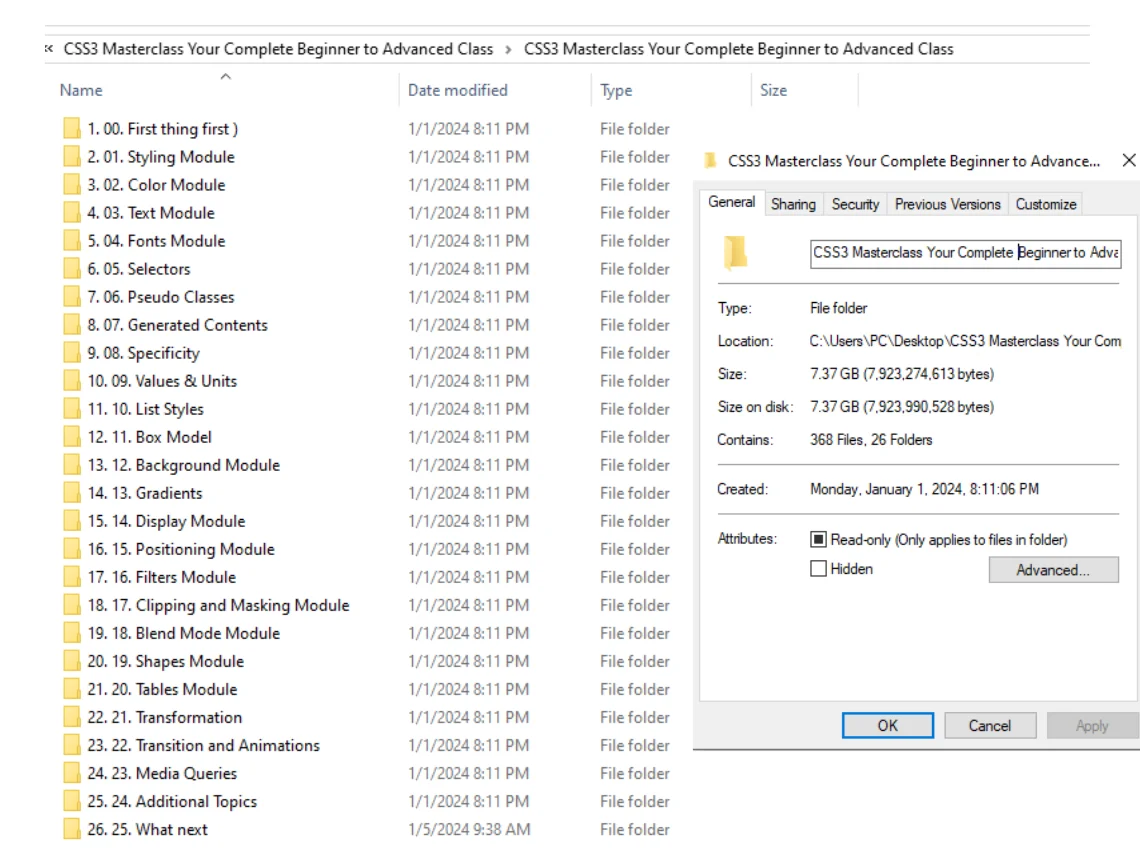
CSS3 is the backbone of modern web design. Without it websites are just plain text on a white background. This CSS3 Masterclass takes you from absolute beginner to advanced professional. You will learn everything from basic styling to complex animations responsive design and modern CSS features. The course covers over 26 detailed modules including color theory typography selectors box model gradients transformations animations media queries and much more. Whether you want to build stunning websites start a freelance career or enhance your development skills this course gives you complete mastery of CSS3. Each concept is explained with practical examples and real world projects. By the end you will be able to build any website design from scratch.
Key Features of CSS3 Masterclass Course
- Complete Curriculum: Over 26 modules covering everything from CSS basics to advanced animations and responsive design.
- Hands On Projects: Build real websites and components as you learn each concept with practical exercises.
- Modern CSS3 Features: Master gradients transformations transitions animations filters clipping masking and blend modes.
- Responsive Design: Learn media queries and mobile first design to build websites that work on all devices.
- Expert Instruction: Clear step by step explanations suitable for complete beginners with no prior experience.
- Tools and Resources: Includes recommended tools debugging techniques and awesome resources for continued learning.
- Certificate of Completion: Receive a certificate after finishing the course to showcase your CSS3 skills.
Why Buy From Sofryx?
- Personally tested by Mani before every listing goes live
- One-time payment — lifetime activation zero renewal fees
- Instant access via your website dashboard after payment
- Telegram support available for all installation queries
What You Get After Purchase
- Complete CSS3 Masterclass video course
- All source code and project files
- Downloadable resources and cheat sheets
- Official download link via your account dashboard
- Step-by-step access guide video and written
- Telegram support contact for access help
- Lifetime access to all future updates
Who Is This For?
This CSS3 Masterclass is designed for anyone who wants to master web styling. Complete beginners with no coding experience will find the course easy to follow. Web developers who know HTML but struggle with CSS will finally understand how to create beautiful layouts. Graphic designers transitioning to web design will learn how to implement their visual ideas. Freelancers who want to offer web design services will gain professional skills. Frontend developers who want to deepen their CSS knowledge will discover advanced techniques. Students preparing for web development careers will build a strong foundation. Hobbyists who want to create personal websites will learn practical skills. If you want to build modern responsive websites this course gives you everything you need.
Course Overview and First Steps
The CSS3 Masterclass begins with the fundamentals. You will learn what CSS3 is and why it matters in modern web development. The course covers the scope of CSS3 and its evolution from earlier versions. You will set up your development environment with professional tools. The first module explains the three types of CSS styling: inline internal and external. You will learn best practices for organizing your CSS code. The course includes CSS debugging techniques to help you find and fix errors quickly. Each concept is demonstrated with live coding examples. You can follow along on your own computer. By the end of the first section you will be styling your first web page. For more information about CSS history visit Wikipedia page on CSS.
Color Module and Text Styling
The color module is where your designs come to life. You will learn all color formats in CSS3 including hex codes RGB RGBA HSL and HSLA. The course covers opacity and transparency techniques for creating modern overlays. You will master the text module with properties like text decoration text transform writing mode and text alignment. Learn to create professional typography that enhances readability and visual appeal. The fonts module teaches you how to use web safe fonts custom fonts and font services. You will understand font properties like family size weight style and variant. These skills form the foundation of beautiful web design. For official CSS documentation visit W3C CSS official website.
Selectors Pseudo Classes and Specificity
Selectors are how CSS targets HTML elements. This module covers all selector types from basic element selectors to complex attribute selectors. You will master pseudo classes like hover focus active visited and first child. Pseudo elements like before and after are covered in depth for generating content. The specificity module explains how browsers decide which styles apply when multiple rules target the same element. You will learn to calculate specificity scores and write efficient CSS that avoids conflicts. Understanding these concepts separates beginners from professional developers. The course includes practical exercises where you solve styling challenges using different selector strategies. For web development tutorials and news visit Smashing Magazine.
Box Model and Background Module
The box model is the most important concept in CSS. Every element on your page is a box. You will master padding margins borders and border radius. Learn to control spacing between elements and create perfect layouts. The background module covers background color background image background position background size and background attachment. You will learn to use multiple backgrounds on single elements. The gradient module teaches linear gradients radial gradients and conic gradients. You can apply gradients to backgrounds and even text. These techniques create modern designs without using image files. The course includes practical projects like building cards buttons and hero sections using box model principles. For CSS tools and resources visit CSS Tricks website.
Display and Positioning Module
The display module controls how elements behave in the layout. You will master display properties like block inline inline-block flex and grid. The positioning module covers static relative absolute fixed and sticky positioning. Learn to create complex layouts with overlapping elements and fixed navigation bars. The floats module teaches traditional layout techniques that are still useful today. The overflow module helps you handle content that does not fit in its container. These skills let you build any layout imaginable. The course includes building a complete website layout from scratch using modern positioning techniques. You will understand when to use each positioning type and how they interact. For responsive design examples visit Responsive Design resources.
Filters Clipping Masking and Blend Modes
Modern CSS3 includes powerful visual effects that were once only possible in image editors. The filters module teaches you to apply blur brightness contrast grayscale hue rotate invert saturate and sepia effects. The clipping and masking module lets you create custom shapes and hide parts of elements. The blend mode module works like Photoshop blending with properties like multiply screen overlay and soft light. The shapes module teaches you to create non-rectangular layouts where text flows around custom shapes. These advanced techniques will make your designs stand out. The course includes practical examples like creating image galleries with hover effects and custom shaped hero sections. For advanced CSS techniques visit MDN CSS documentation.
Transformations Transitions and Animations
This module brings your websites to life. The transformation module teaches 2D and 3D transforms including translate rotate scale and skew. The transition module creates smooth property changes on hover and interaction. Learn to control transition duration timing functions and delays. The animation module covers keyframes for complex multi-step animations. You will learn animation properties like name duration iteration count direction and fill mode. These techniques create engaging user experiences without JavaScript. The course includes building animated loading spinners hover effects and entrance animations. You will understand performance considerations and best practices for web animations. For modern CSS animation inspiration visit CodePen examples.
Media Queries and Responsive Design
Responsive design is essential for modern websites. Mobile devices account for most web traffic today. The media queries module teaches you to write CSS that adapts to different screen sizes. You will learn mobile first design principles. The course covers breakpoints for phones tablets desktops and large screens. You will master responsive typography flexible images and grid systems. Learn to test your responsive designs using browser developer tools. The module includes building a complete responsive website that works perfectly on all devices. You will understand how to make any existing website mobile friendly. These skills are highly valued by employers and clients. For responsive design best practices visit A List Apart articles.
Additional Topics and Tools
The CSS3 Masterclass goes beyond core concepts. The additional topics module covers CSS variables custom properties and CSS functions like calc min max and clamp. You will learn about CSS architecture methodologies like BEM Block Element Modifier. The course introduces CSS preprocessors like Sass and Less. The tools module covers browser developer tools for debugging CSS. You will learn about CSS linters and formatters for code quality. The resources module provides curated lists of learning materials design inspiration and documentation. The course ends with a what next section guiding you toward advanced topics like CSS frameworks CSS in JS and web components. You will have a clear path for continued learning after completing the course.
Projects You Will Build
Practical projects reinforce your learning throughout this CSS3 Masterclass. You will build a personal portfolio website showcasing your work. You will create a responsive navigation bar that works on mobile and desktop. You will design modern buttons with hover effects and transitions. You will build a product card component used in e-commerce sites. You will create an image gallery with lightbox effects. You will build a complete landing page for a fictional company. You will design a contact form with styled inputs and validation states. You will create an animated loading spinner. You will build a CSS grid layout for a magazine style design. Each project builds on previous lessons creating a complete portfolio by course end.
CSS Debugging and Best Practices
Writing CSS is one skill. Debugging CSS is another essential skill. This module teaches you to use browser developer tools effectively. You will learn to inspect elements and see applied styles. You will understand the cascade and inheritance in practice. The course covers common CSS bugs and their solutions. You will learn to use CSS validators to check your code. Best practices include writing maintainable CSS using consistent naming conventions and organizing your stylesheets. You will learn about CSS performance and how to write efficient selectors. The module includes a debugging exercise where you fix broken layouts. These professional skills will save you hours of frustration. For CSS best practices refer to NIST web guidelines.
Frequently Asked Questions
Q: How do I access the CSS3 Masterclass after purchase?
To access your CSS3 Masterclass course follow the provided instructions strictly. After your purchase you will receive a download link and access instructions in your Sofryx account dashboard. A video guide and written instruction notes will be included alongside the access details. The course is hosted on our secure platform. You will receive a unique access code that unlocks all course materials. The video guide walks you through creating your account and accessing the first lesson. If you prefer written instructions we provide detailed notes with screenshots. For any questions during setup our Telegram support is available 24 hours a day. We recommend watching the access guide completely before starting.
Q: How long does delivery take after payment?
Immediately after purchase access links are available in the My Account dashboard under the Downloads section. Sofryx provides instant digital delivery for all products. Once your payment is confirmed which usually takes just a few seconds you will be able to access your course materials. You will also receive an email confirmation with a direct link to your account dashboard. There is no waiting for physical materials to arrive. There is no waiting for a manual email from our support team. This automated system allows you to access your CSS3 Masterclass 24 hours a day 7 days a week. If you do not see the download links within a few minutes please check your account dashboard on bydigital.in first as the email may have been filtered into your spam folder.
Q: What are the prerequisites for this course?
This CSS3 Masterclass has no prerequisites. The course is designed for absolute beginners. You do not need any prior coding experience. You do not need to know HTML although basic HTML knowledge is helpful. The course includes a quick HTML refresher if needed. You need a computer with internet access and a modern web browser. You need a text editor for writing code. Free options like VS Code are recommended. You need at least 4 GB of RAM and 5 GB of free storage space. The course runs on Windows Mac or Linux. No special hardware is required. If you can browse the web you can learn CSS3 from this course.
Q: What is your refund policy?
We stand behind the quality of all our products at Sofryx. However due to the digital nature of this CSS3 Masterclass course which can be accessed instantly we have a specific refund policy. We ask that you refer to and carefully read the full Refund Policy page at bydigital.in before making your purchase. In general we offer full technical support and troubleshooting first to resolve any access or playback issues. If a product is found to be fundamentally non functional as described in our listing and we cannot resolve the issue a refund may be considered. Please note that change of mind or difficulty learning the material are not typically grounds for a refund. For complete details and conditions please visit the official Refund Policy page on our website.
Q: How do I get support if I have an access problem?
We provide comprehensive technical support for this CSS3 Masterclass course. For Windows users remote support is available via AnyDesk UltraViewer or Zoom Meeting. Our experienced support team can connect to your system with your permission to diagnose and resolve any access issue directly. For Mac users similar remote support is available. For all users the first point of contact is our Telegram support channel. The contact details are included in your purchase confirmation email. If the course videos fail to play or download links do not work an alternative access method will be provided. We strive to respond to all support queries within 24 hours or less. Many students have successfully used our support to start learning immediately.
Q: How long will it take to complete the CSS3 Masterclass?
The CSS3 Masterclass contains over 25 hours of video content across 26 modules. Most students complete the course in 4 to 6 weeks studying 5 to 10 hours per week. However you learn at your own pace. Some students finish in 2 weeks by studying full time. Others take 3 months studying on weekends. The course is self paced with no deadlines. You have lifetime access so you can take as long as you need. Each module includes practice exercises that reinforce learning. The final projects may take additional time depending on your design goals. We recommend setting a consistent study schedule for best results. Many students report being job ready after completing the course and building their portfolio projects.
Only logged in customers who have purchased this product may leave a review.
Reviews
There are no reviews yet.