
vMix Pro 28 – Live Video Streaming Software – Windows
Original price was: $600.00.$25.00Current price is: $25.00.
Professional live video streaming software for Windows. vMix Pro 28 enables HD/4K streaming, multi-source mixing, and recording. Lifetime license. No subscription fees.
vMix Pro 28 – Professional Live Video Streaming Software for Windows
Stream professional-quality live video from your Windows PC. vMix Pro 28 is the complete solution for broadcasters, content creators, and organizations requiring reliable, feature-rich video streaming without expensive hardware investments.
Unlike cloud-based streaming services that limit control and require ongoing subscriptions, vMix Pro 28 gives you complete ownership of your streaming infrastructure. Install once, activate for lifetime, and enjoy unlimited streaming, recording, and broadcasting capabilities.
Whether you’re streaming live events, conducting webinars, broadcasting gaming content, managing church services, producing educational content, or running professional broadcasts, vMix Pro 28 delivers the comprehensive streaming capabilities required by modern content creators and broadcasters.
Why vMix Pro 28 Is the Professional Choice for Live Streaming
Professional streaming requires more than just hitting “go live.” You need sophisticated source management, real-time mixing capabilities, multi-platform simultaneous broadcasting, and local recording—all integrated into a single, reliable application.
vMix’s official platform has established itself as the industry standard for software-based video mixing and streaming. vMix Pro 28 represents the latest evolution of this proven platform, with enhanced performance, expanded features, and refined workflow optimization.
The software enables you to produce broadcast-quality video productions on standard Windows PC hardware—eliminating the need for dedicated $50,000+ video mixing consoles while providing superior flexibility and control.
Complete Streaming Workflow – All Tools in One Application
1. Unified Input Management – Centralize All Video Sources
vMix Pro 28 consolidates every possible video and audio input source:
- Multiple Cameras: Connect USB webcams, capture devices, professional cameras
- Network Video: Accept NDI streams from other computers and devices
- Pre-recorded Content: Play video files in any standard format
- DVD Content: Include DVD playback in live productions
- Audio Sources: Connect microphones, mixers, audio interfaces
- Automated Playlists: Create video and audio playlist sequences
- Live Web Content: Capture websites and live feeds
- Network Streams: Accept RTSP video from IP cameras
- Presentations: Display PowerPoint and other presentations
- Graphics & Images: Incorporate photos, graphics, logos
- Color Backgrounds: Use solid colors for clean, professional aesthetics
This unified input architecture eliminates the chaos of managing multiple applications—everything is accessible from vMix Pro 28’s single, intuitive interface.
2. Multi-Platform Simultaneous Streaming – Reach Every Audience
Modern broadcasters cannot limit themselves to a single streaming platform. vMix Pro 28 enables simultaneous streaming to multiple destinations:
- YouTube Live: Stream to your YouTube channel
- Facebook Live: Reach Facebook audiences
- Twitch: Stream to gaming and creative communities
- Custom RTMP Servers: Stream to enterprise streaming infrastructure
- Independent Configuration: Each stream can have different quality settings
- Real-Time Management: Switch destinations or adjust settings during broadcast
- Reliability: Professional-grade connection management
Streaming Media industry analysis confirms that multi-platform streaming is no longer optional—it’s essential for reaching diverse audiences across fragmented social media landscape.
3. Local Recording – Ownership of Your Content
Streaming to platforms means your content lives on their servers. vMix Pro 28 enables simultaneous local recording:
- Independent Recording: Record locally while streaming
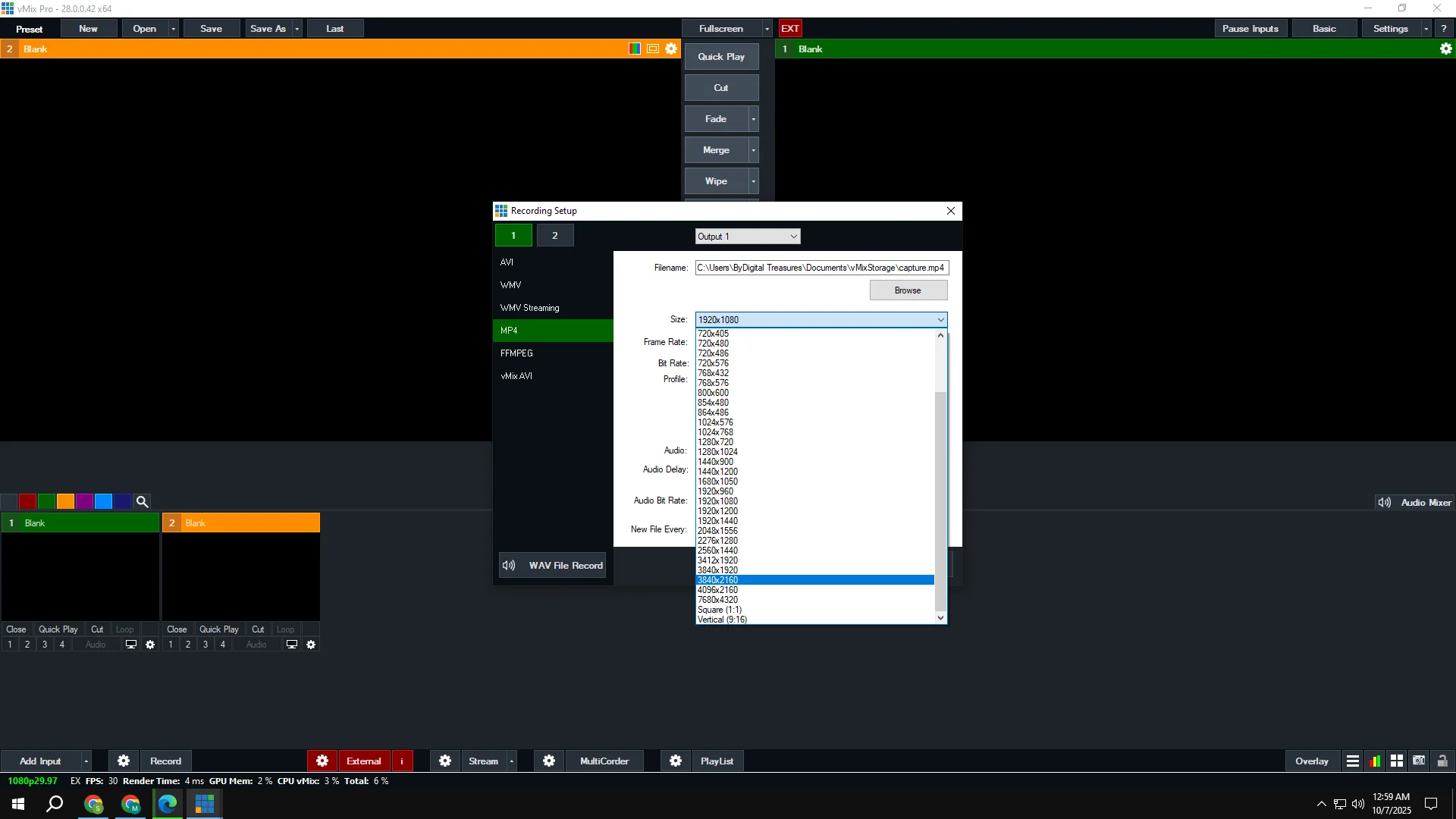
- Multiple Formats: Choose recording codec and quality
- Post-Production Ready: Record at high quality for editing
- Archive Storage: Keep permanent copy of all broadcasts
- Bitrate Independence: Stream at one quality, record at another
- Flexible Storage: Record to any local drive or network storage
- Legal Protection: Maintain your own copy of content
Local recording ensures you retain ownership and control of your content—critical for compliance, archiving, and post-production needs.
4. Professional Transitions – 13 Distinctive Effects
Scene transitions are the invisible bridge between camera angles, sources, and content changes. vMix Pro 28 includes 13 professional transition styles:
- Cut: Instant transition for fast-paced productions
- Fade: Smooth fade through color
- Zoom: Dynamic zoom effect
- Wipe: Professional wipe transition
- Slide: Source slides across screen
- Fly: 3D fly-in entrance
- CrossZoom: Combined cross and zoom
- FlyRotate: 3D rotating entrance
- Cube: 3D cube rotation between sources
- CubeZoom: Cube with zoom effect
- Vertical Wipe: Vertical direction wipe
- Vertical Slide: Vertical slide effect
- Merge: Smooth merge transition
Professional transitions elevate production quality—viewers perceive polished transitions as a hallmark of professional broadcasting.
5. Virtual Sets & Green Screen Technology – Professional Backgrounds
Physical broadcast studios are expensive and space-intensive. vMix Pro 28 provides professional virtual set capability:
- HD Virtual Sets: Professional set designs for news, talk, education
- Real-Time Chroma Key: Green/blue screen processing in real-time
- Advanced Edge Detection: Professional-quality key with clean edges
- Custom Backgrounds: Import your own virtual sets
- Professional Results: Broadcast-quality appearance without hardware
- Lighting Adaptation: Automatic adjustment for different lighting conditions
- Easy Setup: Simple configuration for quick deployment
Virtual sets transform any space—a bedroom, office, or small room—into a professional broadcast environment. This democratization of professional production aesthetics enables independent creators to compete with traditional broadcasters.
6. Cross-Platform Desktop Integration – Multimedia Productions
Modern streaming often requires mixing video with presentations, screen shares, and software demonstrations. vMix Pro 28 enables desktop source capture:
- Windows Desktop Capture: Broadcast any Windows desktop or window
- Mac Desktop Capture: Include Mac computer content in productions
- Real-Time Updates: Dynamic desktop content appears live
- Application Sharing: Share software, websites, presentations
- Full-Screen or Window: Choose what to capture
- Seamless Integration: Desktop content appears as a production source
Desktop capture enables sophisticated productions combining video, presentations, software demonstrations, and graphics.
7. Remote Guest Interview Capability – vMix Call Integration
Professional productions often require remote guest participation. vMix Pro 28 includes integrated vMix Call feature:
- Browser-Based Guest Access: No software download required
- Simple Guest Links: Share URL for instant access
- Professional Integration: Guest appears as production source
- Multiple Guests: Host multiple remote participants simultaneously
- Audio/Video Control: Manage guest quality in real-time
- Screen Sharing: Guests can share screens for presentations
- Direct Recording: Guest conversations record to your output
- No Third-Party Software: Everything integrated within vMix Pro 28
vMix Call eliminates the need for separate video conferencing tools—remote interviews integrate seamlessly into your production workflow.
8. Built-In Graphics & Title System – Professional On-Screen Elements
Professional broadcasts require on-screen graphics, titles, and text. vMix Pro 28 includes comprehensive title and graphic tools:
- Title Templates: Pre-designed professional title graphics
- Lower Thirds: Name and title graphics for talent
- Full-Screen Titles: Large text for announcements
- Credit Rolls: Scrolling credits for production end
- Custom Text: Dynamic text updates during broadcast
- Template Library: Extensive professional designs
- Quick Application: Add graphics instantly during live stream
- Professional Appearance: Broadcast-quality text rendering
Professional graphics enhance viewer experience and convey information clearly—essential for news, sports, webinars, and professional content.
9. Instant Replay & Video Delay – Sports & Entertainment Features
Sports broadcasting and entertainment productions require replay capability. vMix Pro 28 provides professional instant replay:
- Instant Replay: Slow-motion replay of key moments
- Video Delay: Broadcast delay for live event management
- Frame-by-Frame Control: Precise replay navigation
- Variable Speed: Slow motion, normal, fast-forward options
- Loop Playback: Continuous replay of highlights
- Multiple Replay Angles: Switch between replay sources
- Integrated Control: Access directly from production interface
Instant replay elevates sports broadcasting and entertainment—allowing dramatic moments to be relived and enhancing audience engagement.
10. Web Browser Integration – Live Internet Content
Modern streaming often incorporates web content. vMix Pro 28 can capture and integrate live web content:
- Website Display: Show websites in production
- Live Feeds: Incorporate other streaming feeds
- Social Media Integration: Display live social content
- Real-Time Updates: Dynamic content during broadcast
- Interactive Elements: Web-based interactive content
- Seamless Source: Web content integrated as production source
Web integration enables sophisticated productions incorporating internet content alongside traditional video sources.
11. Professional Audio Mixing – Broadcast-Quality Sound
Video streaming is only as good as its audio. vMix Pro 28 includes professional audio mixing capabilities:
- Multi-Channel Mixing: Control multiple audio sources
- Real-Time Faders: Adjust volume during broadcast
- Audio Processing: EQ, compression, effects
- Level Monitoring: Real-time audio level display
- Crossfade: Smooth audio transitions
- Bus Mixing: Complex audio routing
- Professional Quality: Broadcast-grade audio output
- Multiple Input Types: Microphones, mixers, interfaces
Professional audio standards confirm that quality audio is critical for broadcast credibility—poor audio damages production quality more than poor video.
12. Real-Time Video Effects – Creative Visual Enhancement
Beyond basic mixing, vMix Pro 28 provides real-time video effects processing:
- Color Correction: Professional color grading
- Lighting Effects: Enhance visual appearance
- Visual Distortions: Creative visual effects
- Blur & Focus: Depth of field effects
- Custom Chains: Build custom effect combinations
- Real-Time Processing: Effects applied during live streaming
Live effects enable creative visual enhancement without requiring external plugins or post-production processing.
13. Multi-View Layouts – Sophisticated Screen Compositions
Professional productions often require multiple sources visible simultaneously. vMix Pro 28 enables professional multi-view layouts:
- Picture-in-Picture: Multiple sources on screen
- Custom Layouts: Create unique screen arrangements
- Split-Screen: Side-by-side source display
- Quad View: Four sources simultaneously
- Dynamic Switching: Change layouts during broadcast
- Transparency Blending: Overlay multiple sources with transparency
Multi-view layouts enable complex productions where viewers see multiple streams simultaneously—essential for interviews, panel discussions, and sports broadcasts.
14. Full NDI Support – Network Video Distribution
Professional video production increasingly relies on network-based video. vMix Pro 28 includes complete NDI support:
- NDI Send: Stream video over network
- NDI Receive: Accept network video inputs
- Multi-Site Productions: Coordinate video from multiple locations
- Latency-Free: Professional-quality network transmission
- Industry Standard: Compatible with professional NDI ecosystem
- Bandwidth Efficient: Optimized network usage
- Wireless Support: Works over WiFi and Ethernet
NDI (Network Device Interface) official information confirms NDI as the professional standard for network video in modern broadcast workflows.
15. Four Overlay Channels – Complex Graphic Composition
Professional productions require sophisticated graphic layering. vMix Pro 28 provides four independent overlay channels:
- Multiple Overlays: Layer graphics, titles, effects simultaneously
- Independent Control: Each overlay managed separately
- Transparency Blending: Blend overlays with background
- Positioning Control: Place overlays anywhere on screen
- Animation: Animate overlay appearance and movement
- Scaling & Rotation: Resize and rotate overlays
- Layering Order: Control which overlays appear on top
Four overlay channels enable professional-quality graphic composition for news, sports, and entertainment productions.
16. Touch Screen & Web Remote Control – Flexible Operation
Professional productions require flexible operator positioning. vMix Pro 28 offers comprehensive remote control options:
- Touch Screen Support: Control from tablets and touch displays
- Web Interface: Access from any modern web browser
- Wireless Control: Operate from anywhere on network
- Multiple Operators: Multiple people control simultaneously
- Custom Layouts: Design interfaces for specific workflows
- Mobile Friendly: Control from smartphones
- Responsive Design: Works on any device size
Remote control enables flexible production setups where technical operators can manage production from different locations—critical for large venues and distributed operations.
================================================================================
System Requirements – Windows PC Compatibility
| System Component | Requirement |
|---|---|
| Operating System | Windows 11, Windows 10, Windows 8.1, or Windows 7 (64-bit) |
| Processor | Multi-core Intel or AMD processor (quad-core minimum recommended) |
| RAM Memory | 4 GB minimum | 8 GB or more recommended for HD/4K streaming |
| Storage Space | 4 GB free disk space minimum (more for recording storage) |
| Graphics Card | GPU acceleration recommended for effects and 4K processing |
| Internet | Stable connection for streaming (5+ Mbps upload for 1080p60) |
| Display | Dual monitor setup recommended for production workflow |
Storage Calculation: Recording requires approximately 500MB-1GB per hour depending on resolution and bitrate. Plan storage accordingly for long-duration productions.
Internet Requirements: Streaming quality depends on upload speed. YouTube recommends 5 Mbps for 1080p60, but lower bitrates work on slower connections—quality scales accordingly.
================================================================================
Real-World Applications – Professional Use Cases
Live Event Broadcasting
Conferences, concerts, festivals, and sporting events require professional streaming infrastructure. vMix Pro 28 enables event producers to broadcast multi-camera productions to global audiences with professional quality and reliability.
House of Worship & Religious Services
Churches and religious organizations use vMix Pro 28 to stream services to members unable to attend in person. The software enables welcoming online communities while maintaining production professionalism.
Educational Content & Distance Learning
Schools and educators use vMix Pro 28 for live classes, lectures, and webinars. Presentation integration, recording capability, and multi-view layouts support comprehensive educational delivery.
Corporate Communications & Internal Broadcasting
Companies use vMix Pro 28 for town halls, training broadcasts, and internal communications. Multi-location capability enables connecting remote offices for company-wide communications.
Gaming & Esports Broadcasting
Streamers and esports organizations rely on vMix Pro 28 for professional gaming broadcasts. Instant replay, multi-view layouts, and overlay capabilities enable production-quality gaming content.
Professional News & Journalism
News operations and independent journalists use vMix Pro 28 for breaking news broadcasts and live reporting. Professional reliability supports demanding news production workflows.
Music, Performance & Entertainment
Musicians and performance artists use vMix Pro 28 for concert streaming and remote performances. Audio quality and visual presentation capabilities support professional music broadcasting.
Content Creation & YouTube Production
Content creators and YouTubers use vMix Pro 28 for professional live streaming. Multi-source capability and effects enable engaging, sophisticated live content.
================================================================================
vMix Pro 28 vs. Competing Solutions
vMix Pro 28 vs. OBS Studio
OBS Studio is free and popular among hobbyists but offers less polished interface and fewer professional features. vMix Pro 28 provides professional-grade workflow, superior performance, and dedicated support for mission-critical productions.
vMix Pro 28 vs. Wirecast
Wirecast is comparable to vMix but significantly more expensive and emphasizes Mac compatibility. vMix Pro 28 offers better Windows optimization, lower cost, and more comprehensive feature set.
vMix Pro 28 vs. Cloud-Based Streaming Services
Cloud platforms like StreamYard require ongoing subscription fees and limit control. vMix Pro 28 gives you complete local control, no subscription costs, and flexibility to customize any aspect of your production.
vMix Pro 28 vs. Professional Hardware Mixers
Dedicated video mixing hardware costs $10,000-$50,000+ for similar capability. vMix Pro 28 provides equivalent functionality on standard PC hardware at a tiny fraction of hardware costs.
vMix Pro 28 vs. Traditional Broadcast Infrastructure
Traditional broadcast setups require dedicated broadcast facilities, expensive equipment, and specialized expertise. vMix Pro 28 democratizes professional streaming—independent creators and small organizations can now produce broadcast-quality content.
================================================================================
Installation & Getting Started – Fast Setup Process
Pre-Installation Requirements
- Windows 7, 8.1, 10, or 11 (64-bit recommended)
- Multi-core processor
- 4 GB RAM minimum (8 GB for HD/4K)
- 4 GB available disk space
- Administrator access to computer
- Valid serial number (included with lifetime-activated package)
- Internet connection for streaming and online features
Installation Steps
- Download Software: Download vMix Pro 28 installer for Windows.
- Run Installer: Execute installation wizard and follow prompts.
- Choose Location: Select installation directory (default Program Files).
- Select Components: Choose optional plugins and virtual audio drivers.
- Activate License: Enter your genuine serial number.
- Register Online: Complete online registration for lifetime activation.
- Configure Devices: Set up camera, microphone, and audio devices.
- Test Configuration: Perform test broadcast to verify setup.
Genuine Activation Benefit: Unlike illegitimate software requiring ongoing patches and workarounds, genuine vMix Pro 28 activates once for lifetime use. You own the software permanently without licensing anxiety.
================================================================================
Frequently Asked Questions (FAQ)
Q1: What makes vMix Pro 28 better than earlier versions?
vMix Pro 28 is the latest version incorporating performance improvements, refined user interface, expanded platform compatibility, and optimized workflows. Each version builds on previous capabilities with enhancements addressing user feedback and emerging technology trends.
Q2: Can I broadcast to multiple social media platforms at the same time?
Absolutely. vMix Pro 28 simultaneously streams to YouTube, Facebook, Twitch, and custom RTMP servers. Each platform can have independent quality settings and bitrates. This multi-platform capability is one of vMix Pro 28’s most valuable features for reaching diverse audiences.
Q3: Do I need expensive professional cameras for vMix Pro 28?
No. vMix Pro 28 works with any camera vMix supports—webcams, capture devices, professional cameras, and network sources. Your production quality depends more on lighting, content, and audio than camera cost. Webcams produce professional results with proper lighting.
Q4: Will vMix Pro 28 work on my older computer?
vMix Pro 28 supports Windows 7, 8.1, 10, and 11. Minimum specs are 4GB RAM and multi-core processor. Older computers can work, but 8GB RAM and modern processor enable smoother HD/4K streaming. Test on your system before purchasing if possible.
Q5: Is there a subscription fee after I buy vMix Pro 28?
No subscription fees. vMix Pro 28 is one-time purchase with lifetime activation—you own the software forever. Unlike cloud-based services requiring monthly fees, vMix Pro 28 costs nothing after initial purchase.
Q6: Can I record while streaming?
Yes. vMix Pro 28 records locally to disk while simultaneously streaming to online platforms. Recording and streaming are completely independent—you can do either, both, or neither depending on your needs.
Q7: Does vMix Pro 28 work on Mac?
vMix Pro 28 is Windows-only software. Mac users should explore alternative solutions. While running Windows via virtualization is technically possible, official support is for Windows computers only.
Q8: How much internet speed do I need for streaming?
Streaming bitrate determines internet requirements. YouTube recommends 5 Mbps upload for 1080p60 streaming. Lower quality streams need less bandwidth—240p streaming works on 1 Mbps. Test your actual upload speed before critical broadcasts.
Only logged in customers who have purchased this product may leave a review.
Reviews
There are no reviews yet.