


DaVinci Resolve Studio 20.3 — Lifetime Licence | Sofryx
Original price was: $200.00.$15.00Current price is: $15.00.
Buy DaVinci Resolve Studio 20.3 Windows genuine lifetime licence. Full version video editing, color grading, and VFX suite. Personally tested. Instant delivery.
DaVinci Resolve Studio 20.3 Windows — Complete Post-Production Suite for Editing Color Grading VFX and Audio
DaVinci Resolve Studio 20.3 is the only complete post-production solution that combines professional video editing, Hollywood-grade color grading, cinema-quality visual effects, motion graphics, and professional audio processing in a single application. This full version delivers every Studio feature including 32K resolution support, 120fps playback, multi-GPU acceleration, Dolby Vision mastering, the DaVinci Neural Engine with AI-powered editing tools, and over 100 GPU-accelerated Resolve FX plugins. Unlike incomplete versions available elsewhere, this is the genuine full version where every feature works as intended, personally tested and verified by Mani. Whether you are a filmmaker, colorist, VFX artist, or content creator, DaVinci Resolve Studio 20.3 provides the same tools used in Hollywood productions with a lifetime licence from Sofryx.
Key Features of DaVinci Resolve Studio 20.3
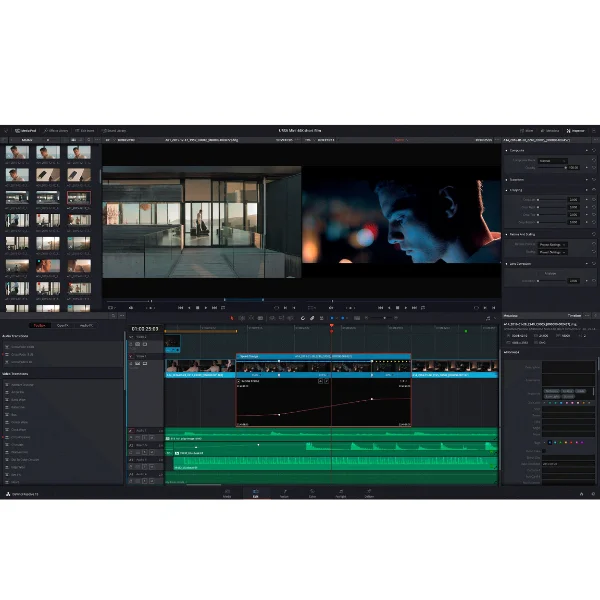
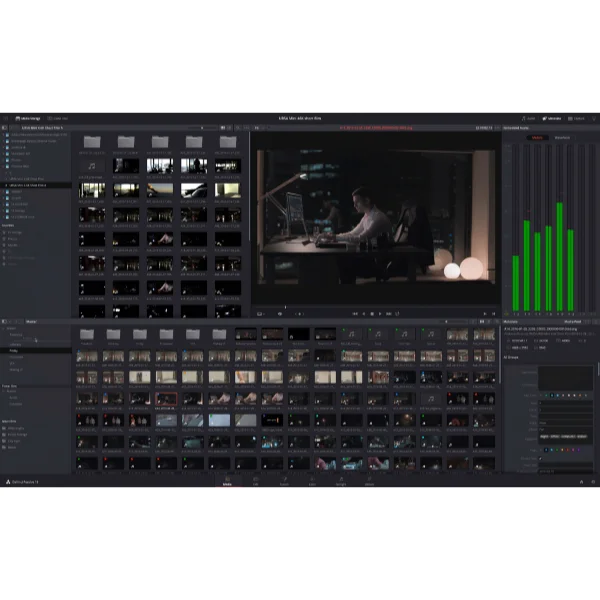
- Complete Post-Production Suite: Six dedicated workspaces including Cut, Edit, Fusion, Color, Fairlight, and Deliver pages for every stage of video production from ingest to final master.
- Hollywood Color Grading: The most advanced color correction tools in the industry with primary and secondary grading, PowerWindows, qualifiers, tracking, HDR support, and Dolby Vision mastering.
- Fusion VFX and Motion Graphics: Node-based compositing engine with hundreds of 2D and 3D tools for creating photorealistic visual effects, titles, and broadcast graphics.
- Fairlight Professional Audio: Full digital audio workstation supporting up to 2000 tracks with real-time equalization, Dolby Atmos mastering, and 3D surround sound up to 22.2 channels.
- DaVinci Neural Engine: AI-powered platform for face detection, magic mask, intelligent framing, resolution upscaling, automatic color matching, and smart editing automation.
- 32K and 120fps Support: Process video at massive resolutions up to 32K and frame rates up to 120fps with multi-GPU acceleration for real-time 10-bit playback.
- Collaborative Workflow: Multi-user editing on shared timelines allowing editors, colorists, VFX artists, and sound designers to work simultaneously on the same project.
- 100+ Resolve FX Plugins: GPU and CPU accelerated effects including lens flares, film grain, noise reduction, object removal, beauty retouching, and image restoration tools.
Why Buy From Sofryx
- Personally tested by Mani before every listing goes live
- Genuine manufacturer-issued licence — not cracked, not trial
- One-time payment — lifetime activation, zero renewal fees
- Instant access via your website dashboard after payment
- Telegram support available for all installation queries
Important Note About This Version
This is the full version of DaVinci Resolve Studio 20.3 where every feature works completely as intended. Many sellers offer incomplete or cracked versions where Studio features are partially functional or broken. This setup file is not available from other sellers and is Mani’s personal guarantee of complete functionality. Every Studio-exclusive feature including the DaVinci Neural Engine, advanced noise reduction, HDR grading, Dolby Vision, 3D surround sound, and all 100+ Resolve FX plugins work perfectly in this genuine full version.
System Requirements
- Operating System: Windows 10 or Windows 11 (64-bit required)
- Processor: Multi-core Intel or AMD processor
- RAM: 16GB minimum (32GB recommended for complex timelines and high-resolution media)
- Storage: 20GB+ free disk space for installation (SSD recommended for media cache and project files)
- Video Card: Dedicated GPU with 2GB+ VRAM, CUDA or OpenCL support (Nvidia GPUs recommended for best performance with CUDA acceleration)
- Display: 1920×1080 minimum resolution
What You Get After Purchase
- Licence key or activation file
- Official download link via your account dashboard
- Step-by-step installation guide (video or written)
- Telegram support contact for installation help
Who Is This For
DaVinci Resolve Studio 20.3 serves every creative professional involved in video production and post-production. Professional video editors working on feature films, television series, documentaries, and streaming content use the Edit and Cut pages for sophisticated nonlinear editing with advanced trimming, multi-camera support, and AI-powered automation tools. Colorists working in commercial post-production houses rely on the Color page as the most advanced grading environment available, which is why DaVinci Resolve is used on more feature films and television programs than any competing solution. VFX artists and motion graphics designers create cinema-quality composites, titles, and broadcast graphics using the Fusion node-based compositing engine. Audio post-production engineers and sound designers use Fairlight for mixing, mastering, and delivering in formats from stereo through Dolby Atmos. YouTubers and social media content creators leverage the streamlined Cut page workflow and AI tools for efficient content production. Documentary producers, corporate video teams, and broadcast professionals all find DaVinci Resolve Studio to be the most complete single-application post-production solution available.
Hollywood-Grade Color Grading — The Industry Standard
The Color page in DaVinci Resolve Studio contains the most advanced color correction and grading tools available in any post-production application, which is why it has become the preferred choice of Hollywood colorists working on major feature films and high-end television productions. The primary correction tools provide comprehensive lift, gamma, and gain controls with color wheels, bars, and curves for establishing the overall look of each shot. The secondary correction tools include PowerWindows for isolating specific areas of the frame with shapes that can be tracked to follow moving subjects, HSL qualifiers for selecting and adjusting specific color ranges, and the 3D keyer for precise isolation of any color in the image. HDR grading tools support all major high-dynamic-range standards including ST.2084 PQ and HLG, with professional HDR scopes displaying information in nits for accurate monitoring. Dolby Vision mastering tools are built directly into the Color page, enabling colorists to create Dolby Vision masters with GPU-accelerated content mapping and advanced trim controls. Professional reviews on G2 consistently rate DaVinci Resolve as the top color grading solution in the industry.
Fusion Visual Effects and Motion Graphics — Node-Based Power
The Fusion page provides a complete node-based compositing environment for creating cinema-quality visual effects and broadcast graphics directly within DaVinci Resolve Studio. Unlike layer-based compositing systems, the node-based workflow enables creation of even the most complex compositions and animations with greater flexibility and processing efficiency. Fusion includes hundreds of 2D and 3D tools covering particle systems, volumetric effects, vector paint, rotoscoping, keying, planar tracking, point tracking, and 3D camera tracking for photorealistic composite work. The 3D workspace supports importing and rendering 3D geometry, lights, cameras, and materials for integrating CGI elements into live-action footage. Text+ provides advanced titling with paragraph controls, line wrapping, and bounding tools for professional typography. Version 20.3 introduces deep image compositing, multi-layer pipelining for OpenEXR files, vector warping tools for image patching, and support for 180 VR content creation. The Fusion page shares the same timeline with the Edit and Color pages, meaning VFX work is immediately available across the entire project without rendering or exporting intermediate files.
Fairlight Professional Audio — Complete Digital Audio Workstation
Fairlight transforms DaVinci Resolve Studio into a full-featured digital audio workstation capable of handling the most demanding audio post-production workflows. The Fairlight Audio Core engine supports up to 2000 simultaneous audio tracks with real-time equalization, dynamics processing, and effects on every track. The 3D surround sound capabilities support audio configurations up to 22.2 channels with import and export of IAB and ADM files for immersive audio delivery. Built-in Dolby Atmos mastering tools enable creation of spatial audio mixes in configurations from 5.1.2 through 9.1.6 with access to remote RMU and local Dolby Atmos Production Suite integration. FairlightFX plugins provide professional audio processing including echo, reverb, noise reduction, hum removal, and de-essing. The voice-over recording tool introduced in version 20 includes cue management, monitoring options, and a built-in teleprompter for efficient narration capture. The AI Audio Assistant automatically creates a finished mix from your timeline tracks, and AI IntelliCut removes silences and separates dialogue by speaker for faster editorial workflows. For detailed audio post-production tutorials, the Blackmagic Design training portal provides comprehensive Fairlight learning resources.
DaVinci Neural Engine — AI-Powered Creative Tools
The DaVinci Neural Engine is an exclusive Studio feature that harnesses neural networks, artificial intelligence, and machine learning to automate complex editing tasks that previously required hours of manual work. Face detection automatically identifies people in footage and sorts clips into bins based on who appears in each shot, dramatically accelerating the organization of interview footage, multi-camera shoots, and documentary material. The Magic Mask v2 with paint brush automatically isolates and tracks objects and people in footage without requiring manual rotoscoping, enabling selective color grading, effects application, and background replacement with minimal effort. AI SuperScale upscales HD content to 4K and 8K using neural network processing that generates genuine detail rather than simple interpolation. The AI Dialogue Matcher matches tone, level, and reverberance across different dialogue clips for consistent sound across scenes. AI IntelliScript creates timelines from a user-provided script, automatically assembling footage based on transcription matching. AI VoiceConvert transforms voice characteristics using built-in and user-trainable models. These AI tools provide access to capabilities that would otherwise require specialized software or extensive manual processing time.
Version 20.3 New Features — Latest AI and Workflow Improvements
DaVinci Resolve Studio 20.3 introduces significant new features across every page of the application. The improved keyframing system includes a dedicated curve view and timeline drawer for precise animation control. The AI Multicam SmartSwitch provides automatic angle switching for multi-camera projects. Apple ProRes encoding is now supported on Windows, enabling delivery in one of the most widely used production formats. New codec support includes GPU-accelerated H.265 4:2:2 encoding and decoding on supported Nvidia systems, MV-HEVC encoding for spatial video content, and support for the latest camera formats from Sony, RED, and Blackmagic. The Cut and Edit pages gain AI Music Editor for automatically editing music to desired length, AI animated subtitles that highlight spoken words, AI Detect Music Beats for beat-synchronized editing, and new optimized UI layouts for vertical video production. The Color page introduces Chroma Color Warper grading, ACES 2.0 support, and OCIO integration as Resolve FX. The Fairlight page adds Clip EQ with 6 bands, Chain FX for frequently used plugin combinations, and improved automation with per-channel mode switching. The application also supports Nvidia Blackwell GPUs with CUDA 12.8 for maximum processing performance.
Collaborative Multi-User Workflow — Team Production
DaVinci Resolve Studio is the only post-production application that enables true multi-user collaboration where editors, colorists, VFX artists, and sound designers can work simultaneously on the same project using a shared database and universal timeline. This collaborative architecture eliminates the traditional round-trip workflow where projects must be exported from one application, processed in another, and then imported back, saving significant time and preventing the version control problems that plague conventional post-production pipelines. All team members see changes in real time as they are made by other users, ensuring that everyone works with the most current version of the project at all times. Blackmagic Cloud integration allows shared folders to be imported directly into the media pool for distributed team workflows. The collaborative system supports project-level locking to prevent conflicting changes while still allowing multiple users to work on different aspects of the project simultaneously. Industry organizations like the Society of Motion Picture and Television Engineers recognize collaborative workflows as essential technology for modern media production.
Professional Format Support and Delivery
DaVinci Resolve Studio 20.3 supports virtually every professional video and audio format used in the media production industry. Beyond the 8-bit content supported by the free version, the Studio edition handles 10-bit and higher professional formats including AVCHD, AVC-Intra, H.264 ALL-I intraframe encoding, IMF packaging according to SMPTE ST.2067, DCP creation for theatrical distribution, and Dolby Vision HDR10+ mastering for streaming platforms. The Deliver page provides comprehensive export options with presets for all major streaming services, broadcast specifications, and distribution formats. Quick Export enables rapid upload to YouTube, Vimeo, and social media platforms from anywhere in the application. Third-party codec plugins extend format support to include XDCAM, XAVC, P2 AVC Ultra, and HEVC Main 10 profiles. The scripting and automation capabilities support Python and LUA scripts with comprehensive APIs for custom workflow integration, enabling studios to build automated pipeline tools and connect DaVinci Resolve to asset management systems and rendering infrastructure. Pair DaVinci Resolve Studio with other professional tools from Sofryx like Topaz Video AI for AI upscaling, FabFilter Total Bundle for audio mastering, Spectrasonics Omnisphere 3 for soundtrack creation, Cubase Pro v15 for music production, and iZotope Neutron 5 for audio mixing. Leading film industry publications like Post Magazine regularly feature DaVinci Resolve in their coverage of post-production technology.
Frequently Asked Questions
Q: How do I activate DaVinci Resolve Studio 20.3 after purchase
To activate your DaVinci Resolve Studio 20.3 on Windows after completing your purchase, follow the provided instructions carefully. This is the full version with every Studio feature working completely, unlike incomplete versions available elsewhere. Your order includes a detailed step-by-step installation guide that walks you through the entire setup process from downloading the installer to completing the activation. A video tutorial or written instruction document will be included alongside the setup files. If you encounter any difficulties during the activation process, reach out via Telegram for immediate assistance from our support team who will guide you through every step.
Q: Is this a genuine lifetime licence or a subscription
This is a genuine lifetime-activated full version that you own permanently after a single one-time payment. There are no monthly fees, no annual renewal charges, and no subscription commitments of any kind. Once activated, your DaVinci Resolve Studio 20.3 remains fully functional on your Windows system indefinitely with every Studio feature working. Every licence sold on Sofryx is personally verified by Mani to ensure authenticity. This is the complete Studio edition with all features including the DaVinci Neural Engine, Dolby Vision, 32K support, 100+ Resolve FX plugins, and collaborative multi-user workflow activated for lifetime use.
Q: Can I use this on multiple computers
Yes, multiple device use is supported with your DaVinci Resolve Studio 20.3 licence. You can install and activate the software on more than one Windows computer, allowing you to work between your primary editing workstation and a portable laptop for on-location editing, client review sessions, and remote work. This flexibility ensures that your professional post-production toolkit is always available wherever you need to work, whether in a studio, production office, or on set. The activation process works identically on each Windows machine.
Q: Will I receive future software updates
There is no immediate need to update your DaVinci Resolve Studio 20.3 after installation as this is the latest version with all current features, AI tools, codec support, and performance improvements included. If a critical update becomes necessary in the future or if you require a newer version for compatibility with new camera formats or GPU drivers, contact Mani directly through Telegram support. The update will be provided free of charge within one year of your original purchase date. This ensures you always have access to a functioning and compatible version without additional cost.
Q: How long does delivery take after payment
Delivery is instant and fully automated. Immediately after completing your payment through the Sofryx checkout, your download links become available in your personal account dashboard. Simply log in to your Sofryx account, navigate to the My Account section, and click on Downloads to access all your purchased files. The complete DaVinci Resolve Studio 20.3 installation package including the full version setup files and activation instructions will be ready for immediate download. There is no waiting period and no manual processing required. You can begin installing and using the software within minutes of completing your purchase.
Q: Which operating system versions are compatible
DaVinci Resolve Studio 20.3 is fully compatible with Windows 10 and Windows 11 in 64-bit editions. Your system requires a multi-core Intel or AMD processor, 16GB RAM minimum with 32GB recommended for complex projects, 20GB+ free disk space with SSD recommended for optimal performance, and a dedicated GPU with 2GB or more video memory supporting CUDA or OpenCL. Nvidia GPUs are recommended for best performance due to CUDA acceleration support, and the latest version includes support for Nvidia Blackwell GPUs with CUDA 12.8. A display with 1920×1080 minimum resolution is required.
Q: What is your refund policy
For complete details regarding our refund terms and conditions, please review the full Refund Policy page available on our website at bydigital.in/refund_returns/. The refund policy outlines all applicable terms including eligibility criteria, timeframes, and the process for requesting a refund on digital product purchases. We encourage every customer to read the policy thoroughly before completing their purchase so they have a clear understanding of their rights and our obligations. Our commitment is to ensure complete customer satisfaction with every product sold on the Sofryx platform.
Q: How do I get support if I have an installation problem
If you encounter any installation difficulties with your DaVinci Resolve Studio 20.3 on Windows, comprehensive support is available through multiple channels. Windows users can receive direct remote support via AnyDesk, UltraViewer, or Zoom Meeting where a support representative will connect to your computer and resolve the installation issue in real time. This is particularly helpful for configuring GPU settings, verifying CUDA or OpenCL compatibility, and ensuring all Studio features activate correctly. If the standard installation encounters any issues, an alternative setup file along with revised instructions will be provided promptly. For all support requests, contact us directly through Telegram at t.me/sofryxhelp for fast and reliable assistance.
Only logged in customers who have purchased this product may leave a review.


Reviews
There are no reviews yet.