



Topaz Video AI 1.2.0 Windows — Lifetime Licence | Sofryx
Original price was: $300.00.$15.00Current price is: $15.00.
Buy Topaz Video AI 1.2.0 genuine lifetime licence. AI-powered video upscaling, Nyx XL denoising, and Starlight restoration for Windows. Personally tested. Instant delivery.
Topaz Video AI 1.2.0 for Windows — AI-Powered Video Upscaling Noise Reduction and Restoration with Nyx XL and Starlight Sharp
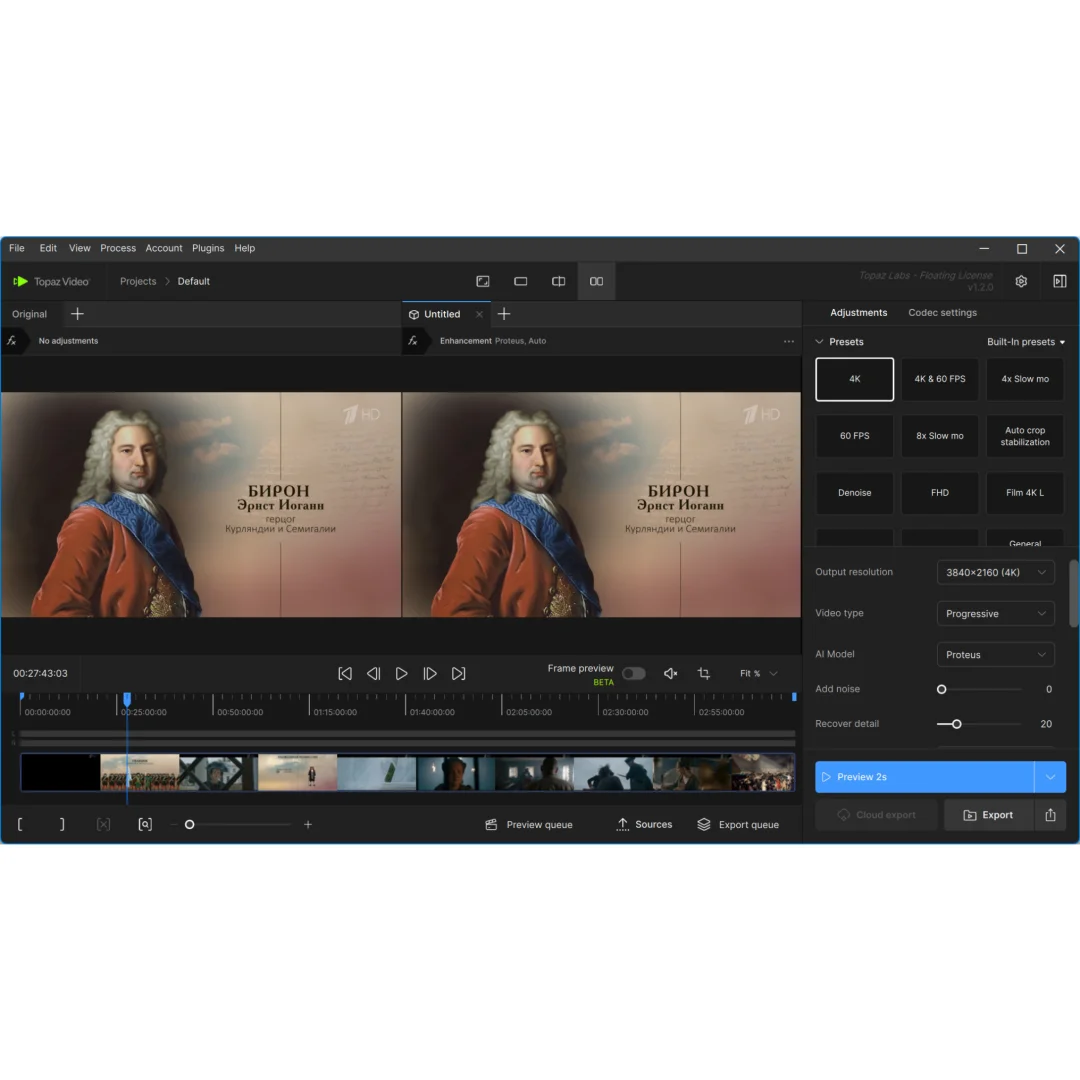
Topaz Video AI 1.2.0 is the professional AI-powered video enhancement software that removes noise from low-light footage, upscales video to 4K and beyond from low-resolution sources, restores focus on soft recordings, and creates new interpolated frames for smooth slow-motion and frame rate conversion. This latest version introduces the all-new Nyx XL AI noise reduction model that preserves significantly more detail than ever before, and the Starlight Sharp diffusion-based restoration model delivering unmatched clarity unavailable in any other solution. Whether you are a filmmaker rescuing underexposed footage, an archivist restoring vintage recordings, or a content creator upscaling old videos for modern platforms, Topaz Video AI 1.2.0 delivers results that transform unusable footage into professional-quality output. Every licence on Sofryx is personally tested by Mani.
Key Features of Topaz Video AI 1.2.0
- Nyx XL Noise Reduction: All-new AI denoising model available on all platforms that removes noise while preserving significantly more fine detail than any previous version.
- Starlight Sharp Restoration: Diffusion-based video restoration model delivering unmatched clarity and detail recovery, currently available on Nvidia Windows for local rendering or cloud processing.
- AI Video Upscaling: Enlarge video resolution from SD to HD, HD to 4K, and beyond using AI models that generate real detail rather than simple interpolation.
- Live Frame Preview: Revolutionary beta tool that instantly updates multiple model parameters as you adjust settings, dramatically improving workflow speed.
- Shared Enhancement Preset: New preset with a single dynamic slider that adjusts multiple model parameters simultaneously for optimal results in most scenarios.
- Frame Rate Interpolation: Create new frames between existing ones for smooth slow-motion effects and frame rate conversion from 24fps to 60fps or higher.
- Focus Restoration: Recover sharpness and clarity from soft, out-of-focus footage using AI models that reconstruct detail lost to camera shake and misfocus.
- Multi-GPU Support: Accelerated processing on Nvidia GTX 900 and higher, AMD Radeon 500 and higher, and Intel ARC A750 graphics cards with 6GB VRAM.
Why Buy From Sofryx
- Personally tested by Mani before every listing goes live
- Genuine manufacturer-issued licence — not cracked, not trial
- One-time payment — lifetime activation, zero renewal fees
- Instant access via your website dashboard after payment
- Telegram support available for all installation queries
System Requirements
- Operating System: Windows 11 (most updated version recommended)
- Processor: Intel or AMD with AVX2 instruction support (CPU release year 2016 or newer)
- RAM: 16GB minimum (32GB or more recommended for 4K processing)
- Nvidia GPU: GTX 900 series or higher with 6GB VRAM
- AMD GPU: Radeon 500 series or higher with 6GB VRAM
- Intel GPU: Intel ARC A750
What You Get After Purchase
- Licence key or activation file
- Official download link via your account dashboard
- Step-by-step installation guide (video or written)
- Telegram support contact for installation help
Who Is This For
Topaz Video AI 1.2.0 serves video professionals and content creators who need to enhance, restore, upscale, or denoise video footage beyond what traditional editing tools can achieve. Filmmakers and cinematographers rescue underexposed low-light footage, stabilize shaky handheld recordings, and upscale lower-resolution B-roll to match primary camera quality. Archival restoration specialists bring vintage VHS tapes, old DVDs, and historical film transfers back to life with AI-powered detail recovery and noise elimination. YouTubers and social media creators upscale older content to 4K for modern platform requirements and denoise footage shot with consumer cameras in challenging lighting. Broadcast engineers clean noisy camera feeds and upscale standard-definition archive footage for HD and 4K broadcast delivery. Wedding videographers rescue footage from dimly lit receptions and churches. Documentary producers restore interview recordings and archival material for broadcast quality. Surveillance and security analysts enhance low-resolution footage for detail recovery. Content producers convert 24fps footage to 60fps for smooth playback on modern displays.
Nyx XL AI Noise Reduction — Maximum Detail Preservation
The all-new Nyx XL AI noise reduction model in Topaz Video AI 1.2.0 represents a significant advancement in video denoising technology, removing noise while preserving substantially more fine detail than any previous Topaz AI model or competing solution. Nyx XL is available on all supported platforms including Nvidia, AMD, and Intel ARC GPUs, making it accessible regardless of your graphics hardware configuration. The model analyzes the temporal and spatial characteristics of noise across multiple frames, distinguishing between random noise fluctuations and genuine image detail with unprecedented accuracy. Low-light footage that was previously considered unusable due to excessive noise can be cleaned to broadcast quality while retaining the fine textures, hair detail, fabric patterns, and surface characteristics that aggressive denoising methods typically destroy. The Nyx XL model is particularly effective at handling the challenging noise patterns produced by high ISO settings on digital cameras, the electronic interference patterns in broadcast feeds, and the grain characteristics in digitized film and VHS transfers.
Starlight Sharp — Diffusion-Based Video Restoration
Starlight Sharp is one of the most powerful AI models in Topaz Video AI 1.2.0, using diffusion-based processing to deliver video restoration with a level of clarity and detail recovery unavailable in any other solution on the market. This model goes beyond noise removal to actively reconstruct lost detail, recovering textures, edges, and fine structures that were degraded by compression, low resolution, or optical limitations in the original recording. Starlight Sharp is particularly resource-intensive due to the computational demands of diffusion-based processing, and is currently available on Nvidia Windows platforms for local rendering or through cloud processing for users without Nvidia hardware. Professional reviews on G2 highlight Starlight as the feature that distinguishes Topaz Video AI from all competing video enhancement tools. The model produces results that look naturally detailed rather than artificially sharpened, preserving the organic quality of the original footage while dramatically improving visual clarity and resolution.
AI Video Upscaling — From SD to 4K and Beyond
Topaz Video AI 1.2.0 uses trained neural network models to upscale video resolution in ways that fundamentally differ from traditional interpolation methods. When conventional upscaling software enlarges video, it simply duplicates or blends existing pixels, producing soft, blurry results that lack genuine detail. The Topaz AI upscaling models analyze the content of each frame and generate new detail that is consistent with the existing image information, producing enlarged video that contains actual texture, edge definition, and fine detail rather than interpolated blur. Standard definition 480p footage can be upscaled to 1080p or 4K with results that approach natively captured high-resolution content. Old DVD collections, VHS transfers, and vintage digital camera recordings gain dramatic visual improvement when processed through the AI upscaling pipeline. The upscaling models work in combination with the noise reduction and restoration models, enabling a processing chain that first cleans the source footage and then enlarges it, producing results that are both cleaner and more detailed than the original.
Live Frame Preview — Instant Real-Time Parameter Adjustment
Live Frame Preview is a revolutionary new tool in Topaz Video AI 1.2.0 that fundamentally improves the workflow for finding optimal enhancement settings. Previously, adjusting model parameters required rendering a preview clip and waiting for the processing to complete before evaluating the results, then repeating the process for each adjustment. Live Frame Preview eliminates this iterative delay by instantly updating the preview as you adjust model parameters in real time, showing the effect of each change immediately without requiring a full render pass. This capability dramatically reduces the time required to find the optimal settings for each piece of footage, as you can visually evaluate dozens of parameter combinations in seconds rather than minutes. Please note that Live Frame Preview is currently in beta and is not yet compatible with some models including Starlight. For detailed workflow guides and model compatibility information, the Topaz Labs documentation provides comprehensive user guidance.
Shared Enhancement Preset — One Slider Dynamic Adjustment
Topaz Video AI 1.2.0 introduces a new shared enhancement preset that works effectively in most enhancement scenarios, paired with a single dynamic adjustment slider that controls multiple model parameters simultaneously. This combination represents a significant workflow improvement because it eliminates the need to manually configure individual parameters for common enhancement tasks. The shared preset provides optimized default settings based on extensive testing across diverse footage types, and the dynamic slider allows you to adjust the overall enhancement intensity with a single control rather than managing multiple independent parameters. Moving the slider toward higher values increases the aggressiveness of noise reduction, detail recovery, and sharpening simultaneously in balanced proportions, while lower values produce more subtle enhancement that preserves more of the original character. This one-slider approach is particularly valuable for batch processing workflows where you need to apply consistent enhancement across multiple clips without spending time fine-tuning individual parameters for each file.
Frame Rate Interpolation — Smooth Motion from Any Source
The frame rate interpolation capability in Topaz Video AI 1.2.0 generates entirely new frames between the existing frames in your video, enabling smooth slow-motion effects and frame rate conversion that were previously impossible without specialized high-speed camera equipment. The AI interpolation model analyzes the motion between consecutive frames and synthesizes new intermediate frames that accurately represent the positions of moving objects at the interpolated time points. 24fps cinematic footage can be converted to 60fps for smooth playback on modern displays and gaming monitors, 30fps video can be slowed to dramatic slow-motion by interpolating additional frames that maintain smooth motion without the stuttering or ghosting artifacts that plague traditional frame blending methods. The interpolation model handles complex motion including rotation, occlusion, and varying speeds across different parts of the frame, producing results that look naturally captured rather than artificially generated. Industry organizations like the Society of Motion Picture and Television Engineers define the frame rate standards that professional content must meet for broadcast and streaming delivery.
Multi-GPU Acceleration — Nvidia AMD and Intel ARC Support
Topaz Video AI 1.2.0 leverages GPU acceleration across all three major graphics card platforms for dramatically faster processing compared to CPU-only rendering. Nvidia GPU support covers the GTX 900 series and all newer generations including the RTX 20, 30, and 40 series with 6GB VRAM minimum. AMD GPU support covers the Radeon 500 series and newer including RX 5000, 6000, and 7000 series cards with 6GB VRAM. Intel ARC A750 provides an additional GPU option for systems equipped with Intel discrete graphics. The processing demands of AI video enhancement are substantial, particularly for 4K output and resource-intensive models like Starlight Sharp, making a modern GPU with adequate VRAM essential for practical processing speeds. The CPU must support AVX2 instructions and should be from 2016 or newer for compatibility with the AI model computation requirements. Leading video production publications like PremiumBeat regularly feature Topaz Video AI in their coverage of AI-powered post-production tools. Pair Topaz Video AI with other tools from Sofryx like Topaz Video AI for Mac for cross-platform workflows, DaVinci Resolve Studio for color grading, Neat Video Pro for Premiere for editorial denoising, Luminar Neo for AI photo editing, and Adobe Photoshop CS3 for image processing.
Frequently Asked Questions
Q: How do I activate Topaz Video AI 1.2.0 after purchase
To activate your Topaz Video AI 1.2.0 on Windows after completing your purchase, follow the provided instructions carefully. Your order includes a detailed step-by-step guide covering the installation of the software, copying the patch file to the installation folder, running the patch, and launching the program. A video tutorial or written instruction document will be included alongside the setup files. You can ignore any patch errors during the process as noted in the instructions. If you encounter any difficulties, reach out via Telegram for immediate assistance.
Q: Is this a genuine lifetime licence or a subscription
This is a genuine lifetime-activated licence that you own permanently after a single one-time payment. There are no monthly fees, no annual renewal charges, and no subscription commitments of any kind. Once activated, your Topaz Video AI 1.2.0 remains fully functional on your Windows system indefinitely without requiring any additional payments. Every licence sold on Sofryx is personally verified by Mani to ensure authenticity and reliable long-term functionality. You receive the complete application with Nyx XL, Starlight Sharp, upscaling, frame interpolation, and all AI models activated for lifetime use.
Q: Can I use this on multiple computers
Yes, multiple device use is supported with your Topaz Video AI 1.2.0 licence. You can install and activate the software on more than one Windows computer, allowing you to have the AI enhancement tools available on your primary editing workstation and a secondary machine for batch processing or portable use. This flexibility ensures that your AI video processing capabilities are available wherever you need to enhance footage. The activation process works identically on each machine.
Q: Will I receive future software updates
There is no immediate need to update your Topaz Video AI 1.2.0 after installation as the current version includes the latest Nyx XL and Starlight Sharp AI models along with all enhancement features. If a critical update becomes necessary in the future or if you require a newer version with updated AI models, contact Mani directly through Telegram support. The update will be provided free of charge within one year of your original purchase date. This ensures you always have access to a functioning version without additional cost.
Q: How long does delivery take after payment
Delivery is instant and fully automated. Immediately after completing your payment through the Sofryx checkout, your download links become available in your personal account dashboard. Simply log in to your Sofryx account, navigate to the My Account section, and click on Downloads to access all your purchased files. The complete Topaz Video AI 1.2.0 installation package including the setup file, patch, and installation instructions will be ready for immediate download. There is no waiting period and no manual processing required.
Q: Which operating system versions are compatible
Topaz Video AI 1.2.0 requires Windows 11 with the most updated version recommended. Your system must have a CPU from 2016 or newer with AVX2 instruction support from either Intel or AMD. RAM requirements are 16GB minimum with 32GB or more recommended for processing high-resolution footage. GPU requirements include an Nvidia GTX 900 series or higher with 6GB VRAM, AMD Radeon 500 series or higher with 6GB VRAM, or Intel ARC A750. The Starlight Sharp model requires an Nvidia GPU on Windows for local rendering.
Q: What is your refund policy
For complete details regarding our refund terms and conditions, please review the full Refund Policy page available on our website at bydigital.in/refund_returns/. The refund policy outlines all applicable terms including eligibility criteria, timeframes, and the process for requesting a refund on digital product purchases. We encourage every customer to read the policy thoroughly before completing their purchase so they have a clear understanding of their rights and our obligations. Our commitment is to ensure complete customer satisfaction with every product sold on the Sofryx platform.
Q: How do I get support if I have an installation problem
If you encounter any installation difficulties with your Topaz Video AI 1.2.0 on Windows, comprehensive support is available through multiple channels. Windows users can receive direct remote support via AnyDesk, UltraViewer, or Zoom Meeting where a support representative will connect to your computer and resolve the installation issue in real time. This is particularly helpful for running the patch file, verifying GPU compatibility, and confirming that AI models including Nyx XL and Starlight Sharp are functioning correctly. If the standard installation encounters any issues, an alternative setup file along with revised instructions will be provided promptly. For all support requests, contact us directly through Telegram at t.me/sofryxhelp for fast and reliable assistance.
Only logged in customers who have purchased this product may leave a review.

Reviews
There are no reviews yet.