
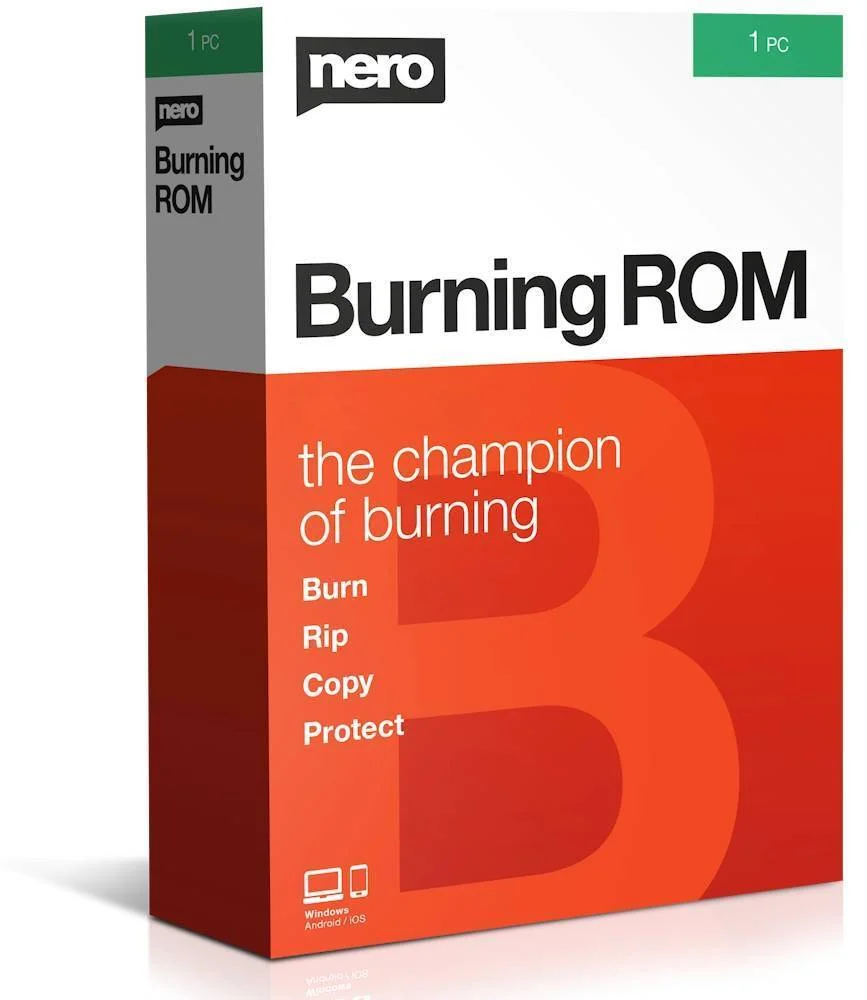
Nero Burning ROM 27 — Lifetime Licence | Sofryx
Original price was: $200.00.$15.00Current price is: $15.00.
Buy Nero Burning ROM 27 genuine lifetime licence. Professional CD, DVD, and Blu-ray burning with SecurDisc data protection. Personally tested. Instant delivery.
Nero Burning ROM 27 — Professional CD DVD and Blu-ray Disc Burning with SecurDisc Data Protection
Nero Burning ROM 27 is the advanced disc burning software trusted by millions of users worldwide for creating CDs, DVDs, and Blu-ray discs with professional reliability and maximum data protection. This comprehensive application goes far beyond simple copying by offering SecurDisc technology for enhanced data security and readability, disc image creation, audio CD compilation from multiple formats, data encryption, and disc spanning for large archives. Whether you are an IT professional creating secure backup archives, a music collector building audio CD compilations, a business owner archiving important documents, or a home user preserving family photos and videos on disc, Nero Burning ROM 27 is the only disc burning solution you need. Fully compatible with Windows 10 and Windows 11. Every licence on Sofryx is personally tested by Mani before listing.
Key Features of Nero Burning ROM 27
- CD DVD and Blu-ray Burning: Create data discs, audio CDs, video DVDs, and Blu-ray discs with professional-grade burning reliability and broad media format support.
- SecurDisc Technology: Protect your burned data with industry-leading SecurDisc technology that ensures maximum data integrity, readability, and long-term preservation on optical media.
- Exact Disc Copying: Duplicate CDs, DVDs, and Blu-ray discs with precise sector-level copying that creates exact replicas of the original disc content and structure.
- Audio CD Creation: Compile audio CDs from MP3, WAV, FLAC, WMA, and other popular music file formats with automatic gap detection and CD-Text support.
- Disc Image Management: Create, save, and mount disc images in ISO, NRG, and other standard formats for virtual disc access without physical media.
- Data Encryption: Protect sensitive files with password encryption and digital signatures before burning to disc for secure distribution and archival storage.
- Windows 10 and 11 Support: Full compatibility with the latest Windows operating systems ensures reliable disc burning on modern hardware and software configurations.
- Disc Spanning: Automatically split large data sets across multiple discs when the content exceeds the capacity of a single CD, DVD, or Blu-ray disc.
Why Buy From Sofryx
- Personally tested by Mani before every listing goes live
- Genuine manufacturer-issued licence — not cracked, not trial
- One-time payment — lifetime activation, zero renewal fees
- Instant access via your website dashboard after payment
- Telegram support available for all installation queries
System Requirements
- Operating System: Windows 7, Windows 8, Windows 8.1, Windows 10, or Windows 11
- Processor: 1 GHz or faster processor
- RAM: 1GB minimum (2GB recommended)
- Storage: 500MB free disk space for installation
- Optical Drive: CD, DVD, or Blu-ray burner drive required for disc creation (not required for disc image creation)
What You Get After Purchase
- Licence key or activation file
- Official download link via your account dashboard
- Step-by-step installation guide (video or written)
- Telegram support contact for installation help
Who Is This For
Nero Burning ROM 27 serves every Windows user who needs to create, copy, or archive data on optical disc media. IT professionals and system administrators use Nero for creating secure backup archives of critical business data on DVD and Blu-ray discs with SecurDisc protection for long-term reliability. Small business owners archive financial records, customer databases, and important documents on disc for off-site storage and regulatory compliance. Data archivists and preservation specialists create verified disc copies of valuable digital assets for permanent storage in climate-controlled archives. Music collectors and audiophiles compile custom audio CDs from digital music libraries with proper track ordering, gap management, and CD-Text metadata. Video producers burn finished projects to DVD and Blu-ray for client delivery, screening copies, and physical distribution. Home users preserve family photographs, home videos, and personal documents on disc as a backup strategy independent of cloud services and hard drive failures. Office workers create data discs for sharing files with clients and colleagues who need physical media delivery.
SecurDisc Technology — Maximum Data Protection and Readability
Nero Burning ROM 27 includes the proprietary SecurDisc technology that provides the highest level of data protection and long-term readability available in any consumer disc burning application. SecurDisc adds redundancy data to burned discs that enables recovery of information even when the disc surface becomes scratched, fingerprinted, or degraded over time due to aging and environmental exposure. Traditional disc burning writes data once with no protection against physical damage, meaning that even minor surface scratches can render files unreadable. SecurDisc overcomes this limitation by incorporating error correction data that allows the disc reader to reconstruct damaged sectors and recover the original file content. The technology also includes digital signature verification that confirms the authenticity and integrity of burned data, detecting any unauthorized modifications or corruption that may have occurred after the disc was created. Password protection allows you to restrict access to sensitive data on the disc, preventing unauthorized users from reading the contents even if they have physical possession of the media. SecurDisc technology works with standard CD, DVD, and Blu-ray media and readers, requiring no special hardware beyond a compatible burner drive.
CD DVD and Blu-ray Disc Burning — Professional Reliability
Nero Burning ROM 27 supports burning to all standard optical disc formats including CD-R, CD-RW, DVD-R, DVD-RW, DVD+R, DVD+RW, DVD-R DL, DVD+R DL, BD-R, BD-RE, BD-R DL, BD-RE DL, and BDXL media. The burning engine has been refined through over two decades of continuous development, making it one of the most reliable and mature disc creation tools available. Professional reviews on G2 consistently rate Nero Burning ROM as the most reliable disc burning solution for Windows. The application automatically detects your burner drive capabilities and the inserted media type, configuring optimal burn settings for the best balance between speed and reliability. Buffer underrun prevention technology ensures that the burning process is not interrupted by temporary system slowdowns, preventing the creation of unusable coasters. Verification options allow you to compare the burned disc content against the original source files after burning to confirm that every byte was written correctly. The disc burning interface supports drag-and-drop file management, making it easy to assemble the content you want to burn and organize it into folders and structures that make sense for your archival or distribution needs.
Audio CD Creation — Music Compilation from Multiple Formats
Nero Burning ROM 27 provides comprehensive audio CD creation capabilities that allow you to compile custom music CDs from digital audio files stored in a wide variety of formats. The application accepts MP3, WAV, FLAC, WMA, AAC, OGG Vorbis, and other popular audio formats as input, automatically converting them to the Red Book audio CD standard during the burning process. This means you can mix tracks from different sources and formats on a single audio CD without manually converting files beforehand. The CD-Text feature embeds artist names, album titles, and track names directly into the disc data so that compatible CD players and car stereo systems display track information during playback. Automatic gap detection and configurable track gaps give you control over the silence between tracks, and gapless burning is available for live albums and DJ mixes where continuous playback is essential. The audio normalization feature adjusts volume levels across tracks from different sources so that the compiled CD plays at a consistent volume throughout without jarring level changes between songs.
Disc Image Creation and Mounting
Nero Burning ROM 27 includes comprehensive disc image management capabilities that allow you to create, save, burn, and mount disc images in multiple standard formats. The application creates disc images in ISO (the universal standard), NRG (Nero native format), and other common image formats from physical discs or from assembled file collections. These disc images serve as exact digital replicas of disc content that can be stored on hard drives, network shares, and cloud storage for backup purposes without requiring physical media. The disc image mounting feature allows you to access the contents of an image file as if a physical disc were inserted in your drive, enabling software installation, media playback, and file access without burning a physical disc. For comprehensive usage guides, the Nero support portal provides detailed documentation on disc image creation and management. Image files can also be burned to physical discs at any time, making them an excellent intermediate storage format for content that may need to be distributed on disc in the future.
Data Encryption and Password Protection
Nero Burning ROM 27 provides built-in data encryption and password protection capabilities that enable you to create secure discs containing sensitive information. The encryption feature applies strong cryptographic protection to the data before it is written to disc, ensuring that the contents cannot be read without the correct password even if the physical disc falls into unauthorized hands. This security feature is essential for businesses that distribute confidential documents, financial records, medical data, or proprietary information on physical media for off-site storage, client delivery, or regulatory compliance archives. The password protection can be applied to entire disc projects or specific files within a project, providing flexible security that matches your specific protection requirements. Digital signatures provide additional verification that the disc contents have not been tampered with since creation, establishing a chain of custody for sensitive data archives. The encryption works with all supported disc formats including CD, DVD, and Blu-ray, ensuring that security features are available regardless of which media type you choose for your protected archive.
Disc Spanning for Large Data Archives
The disc spanning feature in Nero Burning ROM 27 automatically handles data sets that exceed the capacity of a single optical disc by intelligently splitting the content across multiple discs. When your backup archive, document collection, or media library is larger than a single CD (700MB), DVD (4.7GB or 8.5GB dual layer), or Blu-ray disc (25GB, 50GB, or 100GB BDXL), the disc spanning function divides the data across the minimum number of discs required while maintaining file integrity and organizational structure. The spanning process creates a cohesive multi-disc archive that can be restored as a complete data set by inserting the discs in sequence. This capability is particularly valuable for IT professionals creating comprehensive system backups, businesses archiving years of accumulated data, and personal users backing up large photo and video collections that exceed single-disc capacity. The spanning function calculates the optimal distribution of files across discs to minimize the total number of media required while respecting individual file boundaries so that no single file is split across disc boundaries. Industry organizations like the International Organization for Standardization define the optical disc format specifications that Nero Burning ROM implements for universal compatibility.
Exact Disc Copying and Duplication
Nero Burning ROM 27 provides exact disc copying capabilities that create precise sector-level duplicates of original CDs, DVDs, and Blu-ray discs. The copying process reads every sector of the source disc and writes an identical copy to the destination media, preserving the exact disc structure, file system layout, boot sectors, and data organization of the original. This exact copying approach ensures that the duplicate functions identically to the original disc in every application scenario, whether it is a data archive, software installation disc, audio CD, or bootable system recovery disc. The copy process can be performed directly from disc to disc using two optical drives, or through an intermediate disc image file stored on your hard drive when only one drive is available. The image-based copying method is often preferred because it allows verification of the complete source disc read before committing to the burn process, reducing the risk of creating a flawed copy from a source disc that has read errors. Leading technology publications like TechRadar recommend Nero Burning ROM as the most comprehensive disc duplication solution. Pair Nero Burning ROM with other tools from Sofryx like K-Lite Codec Pack for media playback, DaVinci Resolve Studio for video editing, Adobe Photoshop 7.0 for image editing, Cubase Pro v15 for music production, and FabFilter Total Bundle for audio mastering. The How-To Geek regularly features Nero in disc burning guides and tutorials.
Frequently Asked Questions
Q: How do I activate Nero Burning ROM 27 after purchase
To activate your Nero Burning ROM 27 on Windows after completing your purchase, follow the provided instructions carefully. Your order includes a detailed step-by-step installation guide that walks you through the entire setup process from downloading the installer to entering your licence key and completing the activation. A video tutorial or written instruction document will be included alongside the setup files to ensure smooth installation. If you encounter any difficulties during the activation process, reach out via Telegram for immediate assistance from our support team who will guide you through every step.
Q: Is this a genuine lifetime licence or a subscription
This is a genuine lifetime-activated licence that you own permanently after a single one-time payment. There are no monthly fees, no annual renewal charges, and no subscription commitments of any kind. Once activated, your Nero Burning ROM 27 remains fully functional on your Windows system indefinitely without requiring any additional payments. Every licence sold on Sofryx is personally verified by Mani to ensure authenticity and reliable long-term functionality. You receive the complete application with all burning, SecurDisc, encryption, and disc image features activated for lifetime use.
Q: Can I use this on multiple computers
Yes, multiple device use is supported with your Nero Burning ROM 27 licence. You can install and activate the software on more than one Windows computer, allowing you to have disc burning capability on your desktop workstation, laptop, and any other Windows machines you own. This flexibility ensures that you can create, copy, and archive discs on every computer you use, whether at home, in the office, or while traveling. The activation process works identically on each Windows machine.
Q: Will I receive future software updates
There is no immediate need to update your Nero Burning ROM 27 after installation as the current version includes full Windows 10 and Windows 11 compatibility and support for all current optical disc formats. If a critical update becomes necessary in the future for compatibility with a new Windows version or disc format, contact Mani directly through Telegram support. The update will be provided free of charge within one year of your original purchase date. This ensures you always have access to a functioning version without additional cost.
Q: How long does delivery take after payment
Delivery is instant and fully automated. Immediately after completing your payment through the Sofryx checkout, your download links become available in your personal account dashboard. Simply log in to your Sofryx account, navigate to the My Account section, and click on Downloads to access all your purchased files. The complete Nero Burning ROM 27 installation package including the setup file, licence key, and installation instructions will be ready for immediate download. There is no waiting period and no manual processing required. You can begin installing within minutes.
Q: Which operating system versions are compatible
Nero Burning ROM 27 is fully compatible with Windows 7, Windows 8, Windows 8.1, Windows 10, and Windows 11. The system requirements are modest, requiring a 1 GHz or faster processor, 1GB RAM minimum with 2GB recommended, and 500MB free disk space for installation. A CD, DVD, or Blu-ray burner drive is required for creating physical discs, although disc image creation and management features work without a burner drive installed. Any modern Windows computer with an optical drive meets or exceeds these requirements.
Q: What is your refund policy
For complete details regarding our refund terms and conditions, please review the full Refund Policy page available on our website at bydigital.in/refund_returns/. The refund policy outlines all applicable terms including eligibility criteria, timeframes, and the process for requesting a refund on digital product purchases. We encourage every customer to read the policy thoroughly before completing their purchase so they have a clear understanding of their rights and our obligations. Our commitment is to ensure complete customer satisfaction with every product sold on the Sofryx platform.
Q: How do I get support if I have an installation problem
If you encounter any installation difficulties with your Nero Burning ROM 27 on Windows, comprehensive support is available through multiple channels. Windows users can receive direct remote support via AnyDesk, UltraViewer, or Zoom Meeting where a support representative will connect to your computer and resolve the installation issue in real time. This is particularly helpful for configuring burner drive detection, verifying disc format compatibility, and troubleshooting licence activation. If the standard installation encounters any issues, an alternative setup file along with revised instructions will be provided promptly. For all support requests, contact us directly through Telegram at t.me/sofryxhelp for fast and reliable assistance.
Only logged in customers who have purchased this product may leave a review.
Reviews
There are no reviews yet.